Compare commits
9 Commits
infographi
...
async-cont
| Author | SHA1 | Date | |
|---|---|---|---|

|
38787351a0 | ||
|
|
ff44d324eb | ||

|
f30d3ed12c | ||
|
|
6b5c7f102b | ||
|
|
bef614838d | ||
|
|
b3cbe0783a | ||
|
|
fd1097e1b2 | ||
|
|
38430b4b56 | ||
|
|
0cf1447a1f |
@@ -149,6 +149,10 @@ type(scope): brief English description
|
||||
Types: `feat` / `fix` / `docs` / `refactor` / `chore`
|
||||
Scope: plugin folder name (e.g., `github-copilot-sdk`)
|
||||
|
||||
> [!IMPORTANT]
|
||||
> **Issue Association**:
|
||||
> If the changes are related to or fix a GitHub Issue/PR, **MUST** explicitly link and associate it in both Release Notes docs (`v1.x.md`) and Commit Messages Body/Footers (e.g. `(fixes #123)`). Sync those references on GitHub Releases Page bodies when publishing.
|
||||
|
||||
---
|
||||
|
||||
## Full Reference
|
||||
|
||||
@@ -24,13 +24,12 @@ A collection of enhancements, plugins, and prompts for [open-webui](https://gith
|
||||
| Rank | Plugin | Version | Downloads | Views | 📅 Updated |
|
||||
| :---: | :--- | :---: | :---: | :---: | :---: |
|
||||
| 🥇 | [Smart Mind Map](https://openwebui.com/posts/turn_any_text_into_beautiful_mind_maps_3094c59a) |  |  |  |  |
|
||||
| 🥈 | [Smart Infographic](https://openwebui.com/posts/smart_infographic_ad6f0c7f) |  |  |  |  |
|
||||
| 🥈 | [Smart Infographic](https://openwebui.com/posts/smart_infographic_ad6f0c7f) |  |  |  |  |
|
||||
| 🥉 | [Markdown Normalizer](https://openwebui.com/posts/markdown_normalizer_baaa8732) |  |  |  |  |
|
||||
| 4️⃣ | [Async Context Compression](https://openwebui.com/posts/async_context_compression_b1655bc8) |  |  |  |  |
|
||||
| 4️⃣ | [Async Context Compression](https://openwebui.com/posts/async_context_compression_b1655bc8) |  |  |  |  |
|
||||
| 5️⃣ | [Export to Word Enhanced](https://openwebui.com/posts/export_to_word_enhanced_formatting_fca6a315) |  |  |  |  |
|
||||
| 6️⃣ | [AI Task Instruction Generator](https://openwebui.com/posts/ai_task_instruction_generator_9bab8b37) |  |  |  |  |
|
||||
|
||||
|
||||
### 📈 Total Downloads Trend
|
||||

|
||||
|
||||
|
||||
@@ -21,13 +21,12 @@ OpenWebUI 增强功能集合。包含个人开发与收集的插件、提示词
|
||||
| 排名 | 插件 | 版本 | 下载 | 浏览 | 📅 更新 |
|
||||
| :---: | :--- | :---: | :---: | :---: | :---: |
|
||||
| 🥇 | [Smart Mind Map](https://openwebui.com/posts/turn_any_text_into_beautiful_mind_maps_3094c59a) |  |  |  |  |
|
||||
| 🥈 | [Smart Infographic](https://openwebui.com/posts/smart_infographic_ad6f0c7f) |  |  |  |  |
|
||||
| 🥈 | [Smart Infographic](https://openwebui.com/posts/smart_infographic_ad6f0c7f) |  |  |  |  |
|
||||
| 🥉 | [Markdown Normalizer](https://openwebui.com/posts/markdown_normalizer_baaa8732) |  |  |  |  |
|
||||
| 4️⃣ | [Async Context Compression](https://openwebui.com/posts/async_context_compression_b1655bc8) |  |  |  |  |
|
||||
| 4️⃣ | [Async Context Compression](https://openwebui.com/posts/async_context_compression_b1655bc8) |  |  |  |  |
|
||||
| 5️⃣ | [Export to Word Enhanced](https://openwebui.com/posts/export_to_word_enhanced_formatting_fca6a315) |  |  |  |  |
|
||||
| 6️⃣ | [AI Task Instruction Generator](https://openwebui.com/posts/ai_task_instruction_generator_9bab8b37) |  |  |  |  |
|
||||
|
||||
|
||||
### 📈 总下载量累计趋势
|
||||

|
||||
|
||||
|
||||
@@ -1,7 +1,7 @@
|
||||
{
|
||||
"schemaVersion": 1,
|
||||
"label": "downloads",
|
||||
"message": "10.7k",
|
||||
"message": "10.9k",
|
||||
"color": "blue",
|
||||
"namedLogo": "openwebui"
|
||||
}
|
||||
@@ -1,6 +1,6 @@
|
||||
{
|
||||
"schemaVersion": 1,
|
||||
"label": "followers",
|
||||
"message": "418",
|
||||
"message": "422",
|
||||
"color": "blue"
|
||||
}
|
||||
@@ -1,6 +1,6 @@
|
||||
{
|
||||
"schemaVersion": 1,
|
||||
"label": "points",
|
||||
"message": "406",
|
||||
"message": "408",
|
||||
"color": "orange"
|
||||
}
|
||||
@@ -1,6 +1,6 @@
|
||||
{
|
||||
"schemaVersion": 1,
|
||||
"label": "saves",
|
||||
"message": "463",
|
||||
"message": "468",
|
||||
"color": "lightgrey"
|
||||
}
|
||||
@@ -1,6 +1,6 @@
|
||||
{
|
||||
"schemaVersion": 1,
|
||||
"label": "upvotes",
|
||||
"message": "348",
|
||||
"message": "350",
|
||||
"color": "brightgreen"
|
||||
}
|
||||
@@ -1,6 +1,6 @@
|
||||
{
|
||||
"schemaVersion": 1,
|
||||
"label": "views",
|
||||
"message": "115.2k",
|
||||
"message": "117.2k",
|
||||
"color": "blueviolet"
|
||||
}
|
||||
@@ -1,16 +1,16 @@
|
||||
{
|
||||
"total_posts": 30,
|
||||
"total_downloads": 10705,
|
||||
"total_views": 115160,
|
||||
"total_upvotes": 348,
|
||||
"total_downloads": 10862,
|
||||
"total_views": 117161,
|
||||
"total_upvotes": 350,
|
||||
"total_downvotes": 16,
|
||||
"total_saves": 463,
|
||||
"total_saves": 468,
|
||||
"total_comments": 98,
|
||||
"plugin_contributions": 22,
|
||||
"by_type": {
|
||||
"prompt": 2,
|
||||
"tool": 3,
|
||||
"action": 12,
|
||||
"prompt": 2,
|
||||
"pipe": 1,
|
||||
"filter": 4
|
||||
},
|
||||
@@ -22,8 +22,8 @@
|
||||
"version": "1.0.0",
|
||||
"author": "Fu-Jie",
|
||||
"description": "Intelligently analyzes text content and generates interactive mind maps to help users structure and visualize knowledge.",
|
||||
"downloads": 2039,
|
||||
"views": 17967,
|
||||
"downloads": 2054,
|
||||
"views": 18204,
|
||||
"upvotes": 35,
|
||||
"saves": 82,
|
||||
"comments": 23,
|
||||
@@ -36,17 +36,17 @@
|
||||
"title": "Smart Infographic",
|
||||
"slug": "smart_infographic_ad6f0c7f",
|
||||
"type": "action",
|
||||
"version": "1.5.0",
|
||||
"version": "1.6.1",
|
||||
"author": "Fu-Jie",
|
||||
"description": "AI-powered infographic generator based on AntV Infographic. Supports professional templates, auto-icon matching, and SVG/PNG downloads.",
|
||||
"downloads": 1516,
|
||||
"views": 15370,
|
||||
"downloads": 1528,
|
||||
"views": 15541,
|
||||
"upvotes": 30,
|
||||
"saves": 59,
|
||||
"saves": 60,
|
||||
"comments": 12,
|
||||
"is_published_plugin": true,
|
||||
"created_at": "2025-12-28",
|
||||
"updated_at": "2026-03-22",
|
||||
"updated_at": "2026-03-23",
|
||||
"url": "https://openwebui.com/posts/smart_infographic_ad6f0c7f"
|
||||
},
|
||||
{
|
||||
@@ -56,8 +56,8 @@
|
||||
"version": "1.2.8",
|
||||
"author": "Fu-Jie",
|
||||
"description": "A content normalizer filter that fixes common Markdown formatting issues in LLM outputs, such as broken code blocks, LaTeX formulas, and list formatting. Including LaTeX command protection.",
|
||||
"downloads": 965,
|
||||
"views": 9872,
|
||||
"downloads": 978,
|
||||
"views": 10009,
|
||||
"upvotes": 27,
|
||||
"saves": 52,
|
||||
"comments": 6,
|
||||
@@ -73,10 +73,10 @@
|
||||
"version": "1.5.0",
|
||||
"author": "Fu-Jie",
|
||||
"description": "Reduces token consumption in long conversations while maintaining coherence through intelligent summarization and message compression.",
|
||||
"downloads": 935,
|
||||
"views": 8550,
|
||||
"downloads": 952,
|
||||
"views": 8693,
|
||||
"upvotes": 22,
|
||||
"saves": 56,
|
||||
"saves": 57,
|
||||
"comments": 0,
|
||||
"is_published_plugin": true,
|
||||
"created_at": "2025-11-08",
|
||||
@@ -90,9 +90,9 @@
|
||||
"version": "0.4.4",
|
||||
"author": "Fu-Jie",
|
||||
"description": "Export current conversation from Markdown to Word (.docx) with Mermaid diagrams rendered client-side (Mermaid.js, SVG+PNG), LaTeX math, real hyperlinks, improved tables, syntax highlighting, and blockquote support.",
|
||||
"downloads": 920,
|
||||
"views": 7227,
|
||||
"upvotes": 21,
|
||||
"downloads": 935,
|
||||
"views": 7345,
|
||||
"upvotes": 22,
|
||||
"saves": 41,
|
||||
"comments": 8,
|
||||
"is_published_plugin": true,
|
||||
@@ -107,16 +107,33 @@
|
||||
"version": "",
|
||||
"author": "",
|
||||
"description": "",
|
||||
"downloads": 853,
|
||||
"views": 9424,
|
||||
"downloads": 867,
|
||||
"views": 9569,
|
||||
"upvotes": 11,
|
||||
"saves": 27,
|
||||
"saves": 28,
|
||||
"comments": 0,
|
||||
"is_published_plugin": true,
|
||||
"created_at": "2026-01-28",
|
||||
"updated_at": "2026-03-22",
|
||||
"url": "https://openwebui.com/posts/ai_task_instruction_generator_9bab8b37"
|
||||
},
|
||||
{
|
||||
"title": "OpenWebUI Skills Manager Tool",
|
||||
"slug": "openwebui_skills_manager_tool_b4bce8e4",
|
||||
"type": "tool",
|
||||
"version": "0.3.0",
|
||||
"author": "Fu-Jie",
|
||||
"description": "Standalone OpenWebUI tool for managing native Workspace Skills (list/show/install/create/update/delete) for any model.",
|
||||
"downloads": 689,
|
||||
"views": 8285,
|
||||
"upvotes": 10,
|
||||
"saves": 31,
|
||||
"comments": 4,
|
||||
"is_published_plugin": true,
|
||||
"created_at": "2026-02-28",
|
||||
"updated_at": "2026-03-23",
|
||||
"url": "https://openwebui.com/posts/openwebui_skills_manager_tool_b4bce8e4"
|
||||
},
|
||||
{
|
||||
"title": "Export to Excel",
|
||||
"slug": "export_mulit_table_to_excel_244b8f9d",
|
||||
@@ -124,8 +141,8 @@
|
||||
"version": "0.3.7",
|
||||
"author": "Fu-Jie",
|
||||
"description": "Extracts tables from chat messages and exports them to Excel (.xlsx) files with smart formatting.",
|
||||
"downloads": 671,
|
||||
"views": 4084,
|
||||
"downloads": 680,
|
||||
"views": 4151,
|
||||
"upvotes": 13,
|
||||
"saves": 13,
|
||||
"comments": 0,
|
||||
@@ -134,23 +151,6 @@
|
||||
"updated_at": "2026-03-22",
|
||||
"url": "https://openwebui.com/posts/export_mulit_table_to_excel_244b8f9d"
|
||||
},
|
||||
{
|
||||
"title": "OpenWebUI Skills Manager Tool",
|
||||
"slug": "openwebui_skills_manager_tool_b4bce8e4",
|
||||
"type": "tool",
|
||||
"version": "0.3.0",
|
||||
"author": "Fu-Jie",
|
||||
"description": "Standalone OpenWebUI tool for managing native Workspace Skills (list/show/install/create/update/delete) for any model.",
|
||||
"downloads": 663,
|
||||
"views": 8022,
|
||||
"upvotes": 10,
|
||||
"saves": 30,
|
||||
"comments": 4,
|
||||
"is_published_plugin": true,
|
||||
"created_at": "2026-02-28",
|
||||
"updated_at": "2026-03-22",
|
||||
"url": "https://openwebui.com/posts/openwebui_skills_manager_tool_b4bce8e4"
|
||||
},
|
||||
{
|
||||
"title": "GitHub Copilot Official SDK Pipe",
|
||||
"slug": "github_copilot_official_sdk_pipe_ce96f7b4",
|
||||
@@ -158,8 +158,8 @@
|
||||
"version": "0.12.0",
|
||||
"author": "Fu-Jie",
|
||||
"description": "A powerful Agent SDK integration for OpenWebUI. It deeply bridges GitHub Copilot SDK with OpenWebUI's ecosystem, enabling the Agent to autonomously perform intent recognition, web search, and context compaction. It seamlessly reuses your existing Tools, MCP servers, OpenAPI servers, and Skills for a professional, full-featured experience.",
|
||||
"downloads": 460,
|
||||
"views": 6593,
|
||||
"downloads": 462,
|
||||
"views": 6682,
|
||||
"upvotes": 17,
|
||||
"saves": 12,
|
||||
"comments": 19,
|
||||
@@ -175,8 +175,8 @@
|
||||
"version": "0.2.4",
|
||||
"author": "Fu-Jie",
|
||||
"description": "Quickly generates beautiful flashcards from text, extracting key points and categories.",
|
||||
"downloads": 363,
|
||||
"views": 5148,
|
||||
"downloads": 366,
|
||||
"views": 5193,
|
||||
"upvotes": 13,
|
||||
"saves": 23,
|
||||
"comments": 2,
|
||||
@@ -192,8 +192,8 @@
|
||||
"version": "1.0.0",
|
||||
"author": "Fu-Jie",
|
||||
"description": "A comprehensive thinking lens that dives deep into any content - from context to logic, insights, and action paths.",
|
||||
"downloads": 259,
|
||||
"views": 2128,
|
||||
"downloads": 261,
|
||||
"views": 2145,
|
||||
"upvotes": 7,
|
||||
"saves": 17,
|
||||
"comments": 0,
|
||||
@@ -209,8 +209,8 @@
|
||||
"version": "1.0.0",
|
||||
"author": "Fu-Jie",
|
||||
"description": "Intelligently analyzes text content and generates interactive mind maps to help users structure and visualize knowledge.",
|
||||
"downloads": 210,
|
||||
"views": 3264,
|
||||
"downloads": 216,
|
||||
"views": 3341,
|
||||
"upvotes": 7,
|
||||
"saves": 10,
|
||||
"comments": 0,
|
||||
@@ -219,6 +219,23 @@
|
||||
"updated_at": "2026-03-05",
|
||||
"url": "https://openwebui.com/posts/smart_mind_map_tool_auto_generate_interactive_know_d25f4e3d"
|
||||
},
|
||||
{
|
||||
"title": "Batch Install Plugins from GitHub",
|
||||
"slug": "batch_install_plugins_install_popular_plugins_in_s_c9fd6e80",
|
||||
"type": "tool",
|
||||
"version": "1.1.0",
|
||||
"author": "Fu-Jie",
|
||||
"description": "One-click batch install plugins from one or more GitHub repositories to your OpenWebUI instance. If a user mentions multiple repositories in one request, combine them into a single tool call.",
|
||||
"downloads": 183,
|
||||
"views": 4066,
|
||||
"upvotes": 9,
|
||||
"saves": 8,
|
||||
"comments": 6,
|
||||
"is_published_plugin": true,
|
||||
"created_at": "2026-03-15",
|
||||
"updated_at": "2026-03-23",
|
||||
"url": "https://openwebui.com/posts/batch_install_plugins_install_popular_plugins_in_s_c9fd6e80"
|
||||
},
|
||||
{
|
||||
"title": "导出为Word增强版",
|
||||
"slug": "导出为_word_支持公式流程图表格和代码块_8a6306c0",
|
||||
@@ -226,8 +243,8 @@
|
||||
"version": "0.4.4",
|
||||
"author": "Fu-Jie",
|
||||
"description": "将对话导出为 Word (.docx),支持 Mermaid 图表 (客户端渲染 SVG+PNG)、LaTeX 数学公式、真实超链接、增强表格格式、代码高亮和引用块。",
|
||||
"downloads": 180,
|
||||
"views": 3261,
|
||||
"downloads": 181,
|
||||
"views": 3289,
|
||||
"upvotes": 14,
|
||||
"saves": 7,
|
||||
"comments": 4,
|
||||
@@ -236,23 +253,6 @@
|
||||
"updated_at": "2026-03-22",
|
||||
"url": "https://openwebui.com/posts/导出为_word_支持公式流程图表格和代码块_8a6306c0"
|
||||
},
|
||||
{
|
||||
"title": "Batch Install Plugins from GitHub",
|
||||
"slug": "batch_install_plugins_install_popular_plugins_in_s_c9fd6e80",
|
||||
"type": "tool",
|
||||
"version": "1.1.0",
|
||||
"author": "Fu-Jie",
|
||||
"description": "One-click batch install plugins from one or more GitHub repositories to your OpenWebUI instance. If a user mentions multiple repositories in one request, combine them into a single tool call.",
|
||||
"downloads": 171,
|
||||
"views": 3940,
|
||||
"upvotes": 9,
|
||||
"saves": 8,
|
||||
"comments": 6,
|
||||
"is_published_plugin": true,
|
||||
"created_at": "2026-03-15",
|
||||
"updated_at": "2026-03-22",
|
||||
"url": "https://openwebui.com/posts/batch_install_plugins_install_popular_plugins_in_s_c9fd6e80"
|
||||
},
|
||||
{
|
||||
"title": "📂 Folder Memory – Auto-Evolving Project Context",
|
||||
"slug": "folder_memory_auto_evolving_project_context_4a9875b2",
|
||||
@@ -260,8 +260,8 @@
|
||||
"version": "0.1.0",
|
||||
"author": "Fu-Jie",
|
||||
"description": "Automatically extracts project rules from conversations and injects them into the folder's system prompt.",
|
||||
"downloads": 142,
|
||||
"views": 2370,
|
||||
"downloads": 143,
|
||||
"views": 2394,
|
||||
"upvotes": 7,
|
||||
"saves": 15,
|
||||
"comments": 0,
|
||||
@@ -277,8 +277,8 @@
|
||||
"version": "0.1.3",
|
||||
"author": "Fu-Jie",
|
||||
"description": "A specialized filter to bypass OpenWebUI's default RAG for GitHub Copilot SDK models. It moves uploaded files to a safe location ('copilot_files') so the Copilot Pipe can process them natively without interference.",
|
||||
"downloads": 101,
|
||||
"views": 2617,
|
||||
"downloads": 102,
|
||||
"views": 2638,
|
||||
"upvotes": 5,
|
||||
"saves": 1,
|
||||
"comments": 0,
|
||||
@@ -294,8 +294,8 @@
|
||||
"version": "1.5.0",
|
||||
"author": "Fu-Jie",
|
||||
"description": "基于 AntV Infographic 的智能信息图生成插件。支持多种专业模板,自动图标匹配,并提供 SVG/PNG 下载功能。",
|
||||
"downloads": 74,
|
||||
"views": 1731,
|
||||
"downloads": 75,
|
||||
"views": 1747,
|
||||
"upvotes": 10,
|
||||
"saves": 1,
|
||||
"comments": 0,
|
||||
@@ -311,8 +311,8 @@
|
||||
"version": "0.9.2",
|
||||
"author": "Fu-Jie",
|
||||
"description": "智能分析文本内容,生成交互式思维导图,帮助用户结构化和可视化知识。",
|
||||
"downloads": 59,
|
||||
"views": 871,
|
||||
"downloads": 60,
|
||||
"views": 876,
|
||||
"upvotes": 6,
|
||||
"saves": 2,
|
||||
"comments": 0,
|
||||
@@ -328,8 +328,8 @@
|
||||
"version": "1.2.2",
|
||||
"author": "Fu-Jie",
|
||||
"description": "通过智能摘要和消息压缩,降低长对话的 token 消耗,同时保持对话连贯性。",
|
||||
"downloads": 48,
|
||||
"views": 958,
|
||||
"downloads": 49,
|
||||
"views": 965,
|
||||
"upvotes": 7,
|
||||
"saves": 5,
|
||||
"comments": 0,
|
||||
@@ -345,8 +345,8 @@
|
||||
"version": "1.0.0",
|
||||
"author": "Fu-Jie",
|
||||
"description": "全方位的思维透镜 —— 从背景全景到逻辑脉络,从深度洞察到行动路径。",
|
||||
"downloads": 38,
|
||||
"views": 742,
|
||||
"downloads": 39,
|
||||
"views": 753,
|
||||
"upvotes": 5,
|
||||
"saves": 1,
|
||||
"comments": 0,
|
||||
@@ -362,8 +362,8 @@
|
||||
"version": "0.2.4",
|
||||
"author": "Fu-Jie",
|
||||
"description": "快速将文本提炼为精美的学习记忆卡片,支持核心要点提取与分类。",
|
||||
"downloads": 36,
|
||||
"views": 1012,
|
||||
"downloads": 37,
|
||||
"views": 1026,
|
||||
"upvotes": 7,
|
||||
"saves": 1,
|
||||
"comments": 0,
|
||||
@@ -379,10 +379,10 @@
|
||||
"version": "",
|
||||
"author": "",
|
||||
"description": "",
|
||||
"downloads": 2,
|
||||
"views": 9,
|
||||
"downloads": 5,
|
||||
"views": 249,
|
||||
"upvotes": 1,
|
||||
"saves": 0,
|
||||
"saves": 1,
|
||||
"comments": 0,
|
||||
"is_published_plugin": true,
|
||||
"created_at": "2026-03-22",
|
||||
@@ -397,7 +397,7 @@
|
||||
"author": "",
|
||||
"description": "",
|
||||
"downloads": 0,
|
||||
"views": 22,
|
||||
"views": 223,
|
||||
"upvotes": 1,
|
||||
"saves": 0,
|
||||
"comments": 0,
|
||||
@@ -414,7 +414,7 @@
|
||||
"author": "",
|
||||
"description": "",
|
||||
"downloads": 0,
|
||||
"views": 3810,
|
||||
"views": 3820,
|
||||
"upvotes": 8,
|
||||
"saves": 3,
|
||||
"comments": 2,
|
||||
@@ -431,7 +431,7 @@
|
||||
"author": "",
|
||||
"description": "",
|
||||
"downloads": 0,
|
||||
"views": 1900,
|
||||
"views": 1902,
|
||||
"upvotes": 6,
|
||||
"saves": 1,
|
||||
"comments": 0,
|
||||
@@ -448,7 +448,7 @@
|
||||
"author": "",
|
||||
"description": "",
|
||||
"downloads": 0,
|
||||
"views": 2906,
|
||||
"views": 2915,
|
||||
"upvotes": 9,
|
||||
"saves": 4,
|
||||
"comments": 1,
|
||||
@@ -465,7 +465,7 @@
|
||||
"author": "",
|
||||
"description": "",
|
||||
"downloads": 0,
|
||||
"views": 2470,
|
||||
"views": 2472,
|
||||
"upvotes": 7,
|
||||
"saves": 5,
|
||||
"comments": 0,
|
||||
@@ -482,7 +482,7 @@
|
||||
"author": "",
|
||||
"description": "",
|
||||
"downloads": 0,
|
||||
"views": 2149,
|
||||
"views": 2153,
|
||||
"upvotes": 15,
|
||||
"saves": 26,
|
||||
"comments": 9,
|
||||
@@ -499,7 +499,7 @@
|
||||
"author": "",
|
||||
"description": "",
|
||||
"downloads": 0,
|
||||
"views": 278,
|
||||
"views": 279,
|
||||
"upvotes": 2,
|
||||
"saves": 0,
|
||||
"comments": 0,
|
||||
@@ -516,8 +516,8 @@
|
||||
"author": "",
|
||||
"description": "",
|
||||
"downloads": 0,
|
||||
"views": 1630,
|
||||
"upvotes": 16,
|
||||
"views": 1638,
|
||||
"upvotes": 17,
|
||||
"saves": 14,
|
||||
"comments": 2,
|
||||
"is_published_plugin": false,
|
||||
@@ -531,10 +531,10 @@
|
||||
"name": "Fu-Jie",
|
||||
"profile_url": "https://openwebui.com/u/Fu-Jie",
|
||||
"profile_image": "https://community.s3.openwebui.com/uploads/users/b15d1348-4347-42b4-b815-e053342d6cb0/profile_d9510745-4bd4-4f8f-a997-4a21847d9300.webp",
|
||||
"followers": 418,
|
||||
"followers": 422,
|
||||
"following": 9,
|
||||
"total_points": 406,
|
||||
"post_points": 335,
|
||||
"total_points": 408,
|
||||
"post_points": 337,
|
||||
"comment_points": 71,
|
||||
"contributions": 89
|
||||
}
|
||||
|
||||
@@ -1,18 +1,18 @@
|
||||
{
|
||||
"total_posts": 28,
|
||||
"total_downloads": 10400,
|
||||
"total_views": 111981,
|
||||
"total_upvotes": 343,
|
||||
"total_posts": 30,
|
||||
"total_downloads": 10803,
|
||||
"total_views": 116397,
|
||||
"total_upvotes": 349,
|
||||
"total_downvotes": 16,
|
||||
"total_saves": 461,
|
||||
"total_comments": 88,
|
||||
"plugin_contributions": 21,
|
||||
"total_saves": 468,
|
||||
"total_comments": 98,
|
||||
"plugin_contributions": 22,
|
||||
"by_type": {
|
||||
"tool": 3,
|
||||
"pipe": 1,
|
||||
"action": 12,
|
||||
"filter": 4,
|
||||
"prompt": 1
|
||||
"prompt": 2,
|
||||
"pipe": 1,
|
||||
"filter": 4
|
||||
},
|
||||
"posts": [
|
||||
{
|
||||
@@ -22,31 +22,31 @@
|
||||
"version": "1.0.0",
|
||||
"author": "Fu-Jie",
|
||||
"description": "Intelligently analyzes text content and generates interactive mind maps to help users structure and visualize knowledge.",
|
||||
"downloads": 2002,
|
||||
"views": 17578,
|
||||
"downloads": 2051,
|
||||
"views": 18115,
|
||||
"upvotes": 35,
|
||||
"saves": 82,
|
||||
"comments": 23,
|
||||
"is_published_plugin": true,
|
||||
"created_at": "2025-12-30",
|
||||
"updated_at": "2026-03-16",
|
||||
"updated_at": "2026-03-22",
|
||||
"url": "https://openwebui.com/posts/turn_any_text_into_beautiful_mind_maps_3094c59a"
|
||||
},
|
||||
{
|
||||
"title": "Smart Infographic",
|
||||
"slug": "smart_infographic_ad6f0c7f",
|
||||
"type": "action",
|
||||
"version": "1.5.0",
|
||||
"version": "1.6.0",
|
||||
"author": "Fu-Jie",
|
||||
"description": "AI-powered infographic generator based on AntV Infographic. Supports professional templates, auto-icon matching, and SVG/PNG downloads.",
|
||||
"downloads": 1493,
|
||||
"views": 15080,
|
||||
"downloads": 1522,
|
||||
"views": 15470,
|
||||
"upvotes": 30,
|
||||
"saves": 59,
|
||||
"saves": 60,
|
||||
"comments": 12,
|
||||
"is_published_plugin": true,
|
||||
"created_at": "2025-12-28",
|
||||
"updated_at": "2026-03-16",
|
||||
"updated_at": "2026-03-23",
|
||||
"url": "https://openwebui.com/posts/smart_infographic_ad6f0c7f"
|
||||
},
|
||||
{
|
||||
@@ -56,14 +56,14 @@
|
||||
"version": "1.2.8",
|
||||
"author": "Fu-Jie",
|
||||
"description": "A content normalizer filter that fixes common Markdown formatting issues in LLM outputs, such as broken code blocks, LaTeX formulas, and list formatting. Including LaTeX command protection.",
|
||||
"downloads": 937,
|
||||
"views": 9631,
|
||||
"upvotes": 26,
|
||||
"downloads": 974,
|
||||
"views": 9958,
|
||||
"upvotes": 27,
|
||||
"saves": 52,
|
||||
"comments": 6,
|
||||
"is_published_plugin": true,
|
||||
"created_at": "2026-01-12",
|
||||
"updated_at": "2026-03-16",
|
||||
"updated_at": "2026-03-22",
|
||||
"url": "https://openwebui.com/posts/markdown_normalizer_baaa8732"
|
||||
},
|
||||
{
|
||||
@@ -73,14 +73,14 @@
|
||||
"version": "1.5.0",
|
||||
"author": "Fu-Jie",
|
||||
"description": "Reduces token consumption in long conversations while maintaining coherence through intelligent summarization and message compression.",
|
||||
"downloads": 909,
|
||||
"views": 8314,
|
||||
"upvotes": 21,
|
||||
"saves": 56,
|
||||
"downloads": 945,
|
||||
"views": 8634,
|
||||
"upvotes": 22,
|
||||
"saves": 57,
|
||||
"comments": 0,
|
||||
"is_published_plugin": true,
|
||||
"created_at": "2025-11-08",
|
||||
"updated_at": "2026-03-16",
|
||||
"updated_at": "2026-03-22",
|
||||
"url": "https://openwebui.com/posts/async_context_compression_b1655bc8"
|
||||
},
|
||||
{
|
||||
@@ -90,14 +90,14 @@
|
||||
"version": "0.4.4",
|
||||
"author": "Fu-Jie",
|
||||
"description": "Export current conversation from Markdown to Word (.docx) with Mermaid diagrams rendered client-side (Mermaid.js, SVG+PNG), LaTeX math, real hyperlinks, improved tables, syntax highlighting, and blockquote support.",
|
||||
"downloads": 902,
|
||||
"views": 7064,
|
||||
"downloads": 927,
|
||||
"views": 7288,
|
||||
"upvotes": 21,
|
||||
"saves": 41,
|
||||
"comments": 5,
|
||||
"comments": 8,
|
||||
"is_published_plugin": true,
|
||||
"created_at": "2026-01-03",
|
||||
"updated_at": "2026-03-16",
|
||||
"updated_at": "2026-03-22",
|
||||
"url": "https://openwebui.com/posts/export_to_word_enhanced_formatting_fca6a315"
|
||||
},
|
||||
{
|
||||
@@ -107,33 +107,16 @@
|
||||
"version": "",
|
||||
"author": "",
|
||||
"description": "",
|
||||
"downloads": 820,
|
||||
"views": 9132,
|
||||
"downloads": 863,
|
||||
"views": 9511,
|
||||
"upvotes": 11,
|
||||
"saves": 27,
|
||||
"saves": 28,
|
||||
"comments": 0,
|
||||
"is_published_plugin": true,
|
||||
"created_at": "2026-01-28",
|
||||
"updated_at": "2026-01-28",
|
||||
"updated_at": "2026-03-22",
|
||||
"url": "https://openwebui.com/posts/ai_task_instruction_generator_9bab8b37"
|
||||
},
|
||||
{
|
||||
"title": "Export to Excel",
|
||||
"slug": "export_mulit_table_to_excel_244b8f9d",
|
||||
"type": "action",
|
||||
"version": "0.3.7",
|
||||
"author": "Fu-Jie",
|
||||
"description": "Extracts tables from chat messages and exports them to Excel (.xlsx) files with smart formatting.",
|
||||
"downloads": 665,
|
||||
"views": 4014,
|
||||
"upvotes": 13,
|
||||
"saves": 13,
|
||||
"comments": 0,
|
||||
"is_published_plugin": true,
|
||||
"created_at": "2025-05-30",
|
||||
"updated_at": "2026-03-16",
|
||||
"url": "https://openwebui.com/posts/export_mulit_table_to_excel_244b8f9d"
|
||||
},
|
||||
{
|
||||
"title": "OpenWebUI Skills Manager Tool",
|
||||
"slug": "openwebui_skills_manager_tool_b4bce8e4",
|
||||
@@ -141,16 +124,33 @@
|
||||
"version": "0.3.0",
|
||||
"author": "Fu-Jie",
|
||||
"description": "Standalone OpenWebUI tool for managing native Workspace Skills (list/show/install/create/update/delete) for any model.",
|
||||
"downloads": 621,
|
||||
"views": 7653,
|
||||
"upvotes": 9,
|
||||
"saves": 30,
|
||||
"downloads": 681,
|
||||
"views": 8206,
|
||||
"upvotes": 10,
|
||||
"saves": 31,
|
||||
"comments": 4,
|
||||
"is_published_plugin": true,
|
||||
"created_at": "2026-02-28",
|
||||
"updated_at": "2026-03-21",
|
||||
"updated_at": "2026-03-23",
|
||||
"url": "https://openwebui.com/posts/openwebui_skills_manager_tool_b4bce8e4"
|
||||
},
|
||||
{
|
||||
"title": "Export to Excel",
|
||||
"slug": "export_mulit_table_to_excel_244b8f9d",
|
||||
"type": "action",
|
||||
"version": "0.3.7",
|
||||
"author": "Fu-Jie",
|
||||
"description": "Extracts tables from chat messages and exports them to Excel (.xlsx) files with smart formatting.",
|
||||
"downloads": 676,
|
||||
"views": 4119,
|
||||
"upvotes": 13,
|
||||
"saves": 13,
|
||||
"comments": 0,
|
||||
"is_published_plugin": true,
|
||||
"created_at": "2025-05-30",
|
||||
"updated_at": "2026-03-22",
|
||||
"url": "https://openwebui.com/posts/export_mulit_table_to_excel_244b8f9d"
|
||||
},
|
||||
{
|
||||
"title": "GitHub Copilot Official SDK Pipe",
|
||||
"slug": "github_copilot_official_sdk_pipe_ce96f7b4",
|
||||
@@ -158,14 +158,14 @@
|
||||
"version": "0.12.0",
|
||||
"author": "Fu-Jie",
|
||||
"description": "A powerful Agent SDK integration for OpenWebUI. It deeply bridges GitHub Copilot SDK with OpenWebUI's ecosystem, enabling the Agent to autonomously perform intent recognition, web search, and context compaction. It seamlessly reuses your existing Tools, MCP servers, OpenAPI servers, and Skills for a professional, full-featured experience.",
|
||||
"downloads": 439,
|
||||
"views": 6376,
|
||||
"downloads": 461,
|
||||
"views": 6662,
|
||||
"upvotes": 17,
|
||||
"saves": 12,
|
||||
"comments": 12,
|
||||
"comments": 19,
|
||||
"is_published_plugin": true,
|
||||
"created_at": "2026-01-26",
|
||||
"updated_at": "2026-03-21",
|
||||
"updated_at": "2026-03-22",
|
||||
"url": "https://openwebui.com/posts/github_copilot_official_sdk_pipe_ce96f7b4"
|
||||
},
|
||||
{
|
||||
@@ -175,14 +175,14 @@
|
||||
"version": "0.2.4",
|
||||
"author": "Fu-Jie",
|
||||
"description": "Quickly generates beautiful flashcards from text, extracting key points and categories.",
|
||||
"downloads": 355,
|
||||
"views": 5045,
|
||||
"downloads": 363,
|
||||
"views": 5160,
|
||||
"upvotes": 13,
|
||||
"saves": 23,
|
||||
"comments": 2,
|
||||
"is_published_plugin": true,
|
||||
"created_at": "2025-12-30",
|
||||
"updated_at": "2026-03-16",
|
||||
"updated_at": "2026-03-22",
|
||||
"url": "https://openwebui.com/posts/flash_card_65a2ea8f"
|
||||
},
|
||||
{
|
||||
@@ -192,8 +192,8 @@
|
||||
"version": "1.0.0",
|
||||
"author": "Fu-Jie",
|
||||
"description": "A comprehensive thinking lens that dives deep into any content - from context to logic, insights, and action paths.",
|
||||
"downloads": 256,
|
||||
"views": 2105,
|
||||
"downloads": 261,
|
||||
"views": 2143,
|
||||
"upvotes": 7,
|
||||
"saves": 17,
|
||||
"comments": 0,
|
||||
@@ -209,8 +209,8 @@
|
||||
"version": "1.0.0",
|
||||
"author": "Fu-Jie",
|
||||
"description": "Intelligently analyzes text content and generates interactive mind maps to help users structure and visualize knowledge.",
|
||||
"downloads": 194,
|
||||
"views": 3141,
|
||||
"downloads": 213,
|
||||
"views": 3316,
|
||||
"upvotes": 7,
|
||||
"saves": 10,
|
||||
"comments": 0,
|
||||
@@ -219,6 +219,23 @@
|
||||
"updated_at": "2026-03-05",
|
||||
"url": "https://openwebui.com/posts/smart_mind_map_tool_auto_generate_interactive_know_d25f4e3d"
|
||||
},
|
||||
{
|
||||
"title": "Batch Install Plugins from GitHub",
|
||||
"slug": "batch_install_plugins_install_popular_plugins_in_s_c9fd6e80",
|
||||
"type": "tool",
|
||||
"version": "1.1.0",
|
||||
"author": "Fu-Jie",
|
||||
"description": "One-click batch install plugins from one or more GitHub repositories to your OpenWebUI instance. If a user mentions multiple repositories in one request, combine them into a single tool call.",
|
||||
"downloads": 181,
|
||||
"views": 4017,
|
||||
"upvotes": 9,
|
||||
"saves": 8,
|
||||
"comments": 6,
|
||||
"is_published_plugin": true,
|
||||
"created_at": "2026-03-15",
|
||||
"updated_at": "2026-03-23",
|
||||
"url": "https://openwebui.com/posts/batch_install_plugins_install_popular_plugins_in_s_c9fd6e80"
|
||||
},
|
||||
{
|
||||
"title": "导出为Word增强版",
|
||||
"slug": "导出为_word_支持公式流程图表格和代码块_8a6306c0",
|
||||
@@ -226,14 +243,14 @@
|
||||
"version": "0.4.4",
|
||||
"author": "Fu-Jie",
|
||||
"description": "将对话导出为 Word (.docx),支持 Mermaid 图表 (客户端渲染 SVG+PNG)、LaTeX 数学公式、真实超链接、增强表格格式、代码高亮和引用块。",
|
||||
"downloads": 179,
|
||||
"views": 3218,
|
||||
"downloads": 181,
|
||||
"views": 3275,
|
||||
"upvotes": 14,
|
||||
"saves": 7,
|
||||
"comments": 4,
|
||||
"is_published_plugin": true,
|
||||
"created_at": "2026-01-04",
|
||||
"updated_at": "2026-03-16",
|
||||
"updated_at": "2026-03-22",
|
||||
"url": "https://openwebui.com/posts/导出为_word_支持公式流程图表格和代码块_8a6306c0"
|
||||
},
|
||||
{
|
||||
@@ -243,8 +260,8 @@
|
||||
"version": "0.1.0",
|
||||
"author": "Fu-Jie",
|
||||
"description": "Automatically extracts project rules from conversations and injects them into the folder's system prompt.",
|
||||
"downloads": 141,
|
||||
"views": 2337,
|
||||
"downloads": 143,
|
||||
"views": 2392,
|
||||
"upvotes": 7,
|
||||
"saves": 15,
|
||||
"comments": 0,
|
||||
@@ -253,23 +270,6 @@
|
||||
"updated_at": "2026-01-20",
|
||||
"url": "https://openwebui.com/posts/folder_memory_auto_evolving_project_context_4a9875b2"
|
||||
},
|
||||
{
|
||||
"title": "Batch Install Plugins from GitHub",
|
||||
"slug": "batch_install_plugins_install_popular_plugins_in_s_c9fd6e80",
|
||||
"type": "tool",
|
||||
"version": "1.1.0",
|
||||
"author": "Fu-Jie",
|
||||
"description": "One-click batch install plugins from one or more GitHub repositories to your OpenWebUI instance. If a user mentions multiple repositories in one request, combine them into a single tool call.",
|
||||
"downloads": 135,
|
||||
"views": 3487,
|
||||
"upvotes": 9,
|
||||
"saves": 6,
|
||||
"comments": 6,
|
||||
"is_published_plugin": true,
|
||||
"created_at": "2026-03-15",
|
||||
"updated_at": "2026-03-21",
|
||||
"url": "https://openwebui.com/posts/batch_install_plugins_install_popular_plugins_in_s_c9fd6e80"
|
||||
},
|
||||
{
|
||||
"title": "GitHub Copilot SDK Files Filter",
|
||||
"slug": "github_copilot_sdk_files_filter_403a62ee",
|
||||
@@ -277,14 +277,14 @@
|
||||
"version": "0.1.3",
|
||||
"author": "Fu-Jie",
|
||||
"description": "A specialized filter to bypass OpenWebUI's default RAG for GitHub Copilot SDK models. It moves uploaded files to a safe location ('copilot_files') so the Copilot Pipe can process them natively without interference.",
|
||||
"downloads": 99,
|
||||
"views": 2562,
|
||||
"downloads": 102,
|
||||
"views": 2632,
|
||||
"upvotes": 5,
|
||||
"saves": 1,
|
||||
"comments": 0,
|
||||
"is_published_plugin": true,
|
||||
"created_at": "2026-02-09",
|
||||
"updated_at": "2026-03-16",
|
||||
"updated_at": "2026-03-22",
|
||||
"url": "https://openwebui.com/posts/github_copilot_sdk_files_filter_403a62ee"
|
||||
},
|
||||
{
|
||||
@@ -295,13 +295,13 @@
|
||||
"author": "Fu-Jie",
|
||||
"description": "基于 AntV Infographic 的智能信息图生成插件。支持多种专业模板,自动图标匹配,并提供 SVG/PNG 下载功能。",
|
||||
"downloads": 74,
|
||||
"views": 1698,
|
||||
"views": 1736,
|
||||
"upvotes": 10,
|
||||
"saves": 1,
|
||||
"comments": 0,
|
||||
"is_published_plugin": true,
|
||||
"created_at": "2025-12-28",
|
||||
"updated_at": "2026-03-16",
|
||||
"updated_at": "2026-03-22",
|
||||
"url": "https://openwebui.com/posts/智能信息图_e04a48ff"
|
||||
},
|
||||
{
|
||||
@@ -311,8 +311,8 @@
|
||||
"version": "0.9.2",
|
||||
"author": "Fu-Jie",
|
||||
"description": "智能分析文本内容,生成交互式思维导图,帮助用户结构化和可视化知识。",
|
||||
"downloads": 57,
|
||||
"views": 861,
|
||||
"downloads": 59,
|
||||
"views": 871,
|
||||
"upvotes": 6,
|
||||
"saves": 2,
|
||||
"comments": 0,
|
||||
@@ -328,8 +328,8 @@
|
||||
"version": "1.2.2",
|
||||
"author": "Fu-Jie",
|
||||
"description": "通过智能摘要和消息压缩,降低长对话的 token 消耗,同时保持对话连贯性。",
|
||||
"downloads": 48,
|
||||
"views": 949,
|
||||
"downloads": 49,
|
||||
"views": 964,
|
||||
"upvotes": 7,
|
||||
"saves": 5,
|
||||
"comments": 0,
|
||||
@@ -346,7 +346,7 @@
|
||||
"author": "Fu-Jie",
|
||||
"description": "全方位的思维透镜 —— 从背景全景到逻辑脉络,从深度洞察到行动路径。",
|
||||
"downloads": 38,
|
||||
"views": 738,
|
||||
"views": 743,
|
||||
"upvotes": 5,
|
||||
"saves": 1,
|
||||
"comments": 0,
|
||||
@@ -363,15 +363,49 @@
|
||||
"author": "Fu-Jie",
|
||||
"description": "快速将文本提炼为精美的学习记忆卡片,支持核心要点提取与分类。",
|
||||
"downloads": 36,
|
||||
"views": 998,
|
||||
"views": 1016,
|
||||
"upvotes": 7,
|
||||
"saves": 1,
|
||||
"comments": 0,
|
||||
"is_published_plugin": true,
|
||||
"created_at": "2025-12-30",
|
||||
"updated_at": "2026-03-16",
|
||||
"updated_at": "2026-03-22",
|
||||
"url": "https://openwebui.com/posts/闪记卡生成插件_4a31eac3"
|
||||
},
|
||||
{
|
||||
"title": "🔍 One-Sentence Concept Explainer",
|
||||
"slug": "one_sentence_concept_explainer_79be55d3",
|
||||
"type": "prompt",
|
||||
"version": "",
|
||||
"author": "",
|
||||
"description": "",
|
||||
"downloads": 3,
|
||||
"views": 169,
|
||||
"upvotes": 1,
|
||||
"saves": 1,
|
||||
"comments": 0,
|
||||
"is_published_plugin": true,
|
||||
"created_at": "2026-03-22",
|
||||
"updated_at": "2026-03-22",
|
||||
"url": "https://openwebui.com/posts/one_sentence_concept_explainer_79be55d3"
|
||||
},
|
||||
{
|
||||
"title": "🧠 Wisdom Synthesizer (Collective Wisdom Synthesizer)",
|
||||
"slug": "wisdom_synthesizer_collective_wisdom_synthesizer_f7c0d0fe",
|
||||
"type": "action",
|
||||
"version": "",
|
||||
"author": "",
|
||||
"description": "",
|
||||
"downloads": 0,
|
||||
"views": 99,
|
||||
"upvotes": 1,
|
||||
"saves": 0,
|
||||
"comments": 0,
|
||||
"is_published_plugin": false,
|
||||
"created_at": "2026-03-22",
|
||||
"updated_at": "2026-03-22",
|
||||
"url": "https://openwebui.com/posts/wisdom_synthesizer_collective_wisdom_synthesizer_f7c0d0fe"
|
||||
},
|
||||
{
|
||||
"title": "An Unconventional Use of Open Terminal ⚡",
|
||||
"slug": "an_unconventional_use_of_open_terminal_35498f8f",
|
||||
@@ -380,9 +414,9 @@
|
||||
"author": "",
|
||||
"description": "",
|
||||
"downloads": 0,
|
||||
"views": 3762,
|
||||
"views": 3817,
|
||||
"upvotes": 8,
|
||||
"saves": 2,
|
||||
"saves": 3,
|
||||
"comments": 2,
|
||||
"is_published_plugin": false,
|
||||
"created_at": "2026-03-06",
|
||||
@@ -397,7 +431,7 @@
|
||||
"author": "",
|
||||
"description": "",
|
||||
"downloads": 0,
|
||||
"views": 1888,
|
||||
"views": 1902,
|
||||
"upvotes": 6,
|
||||
"saves": 1,
|
||||
"comments": 0,
|
||||
@@ -414,7 +448,7 @@
|
||||
"author": "",
|
||||
"description": "",
|
||||
"downloads": 0,
|
||||
"views": 2888,
|
||||
"views": 2911,
|
||||
"upvotes": 9,
|
||||
"saves": 4,
|
||||
"comments": 1,
|
||||
@@ -431,7 +465,7 @@
|
||||
"author": "",
|
||||
"description": "",
|
||||
"downloads": 0,
|
||||
"views": 2468,
|
||||
"views": 2471,
|
||||
"upvotes": 7,
|
||||
"saves": 5,
|
||||
"comments": 0,
|
||||
@@ -448,9 +482,9 @@
|
||||
"author": "",
|
||||
"description": "",
|
||||
"downloads": 0,
|
||||
"views": 2133,
|
||||
"views": 2149,
|
||||
"upvotes": 15,
|
||||
"saves": 25,
|
||||
"saves": 26,
|
||||
"comments": 9,
|
||||
"is_published_plugin": false,
|
||||
"created_at": "2026-01-25",
|
||||
@@ -465,7 +499,7 @@
|
||||
"author": "",
|
||||
"description": "",
|
||||
"downloads": 0,
|
||||
"views": 277,
|
||||
"views": 279,
|
||||
"upvotes": 2,
|
||||
"saves": 0,
|
||||
"comments": 0,
|
||||
@@ -482,9 +516,9 @@
|
||||
"author": "",
|
||||
"description": "",
|
||||
"downloads": 0,
|
||||
"views": 1618,
|
||||
"upvotes": 16,
|
||||
"saves": 13,
|
||||
"views": 1638,
|
||||
"upvotes": 17,
|
||||
"saves": 14,
|
||||
"comments": 2,
|
||||
"is_published_plugin": false,
|
||||
"created_at": "2026-01-10",
|
||||
@@ -497,11 +531,11 @@
|
||||
"name": "Fu-Jie",
|
||||
"profile_url": "https://openwebui.com/u/Fu-Jie",
|
||||
"profile_image": "https://community.s3.openwebui.com/uploads/users/b15d1348-4347-42b4-b815-e053342d6cb0/profile_d9510745-4bd4-4f8f-a997-4a21847d9300.webp",
|
||||
"followers": 406,
|
||||
"following": 8,
|
||||
"total_points": 401,
|
||||
"post_points": 330,
|
||||
"followers": 419,
|
||||
"following": 9,
|
||||
"total_points": 407,
|
||||
"post_points": 336,
|
||||
"comment_points": 71,
|
||||
"contributions": 81
|
||||
"contributions": 89
|
||||
}
|
||||
}
|
||||
@@ -8,7 +8,7 @@
|
||||
> *Blue: Downloads | Purple: Views (Real-time dynamic)*
|
||||
|
||||
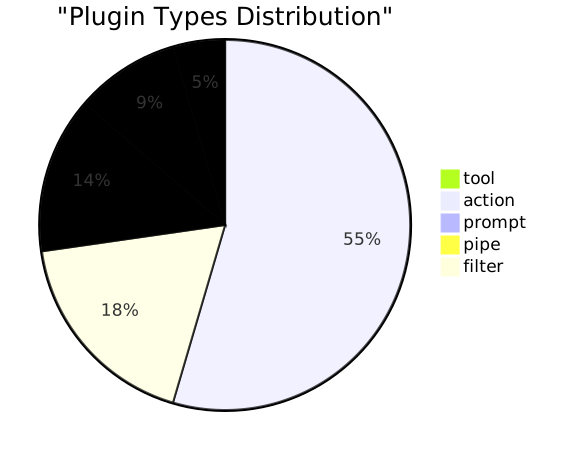
### 📂 Content Distribution
|
||||
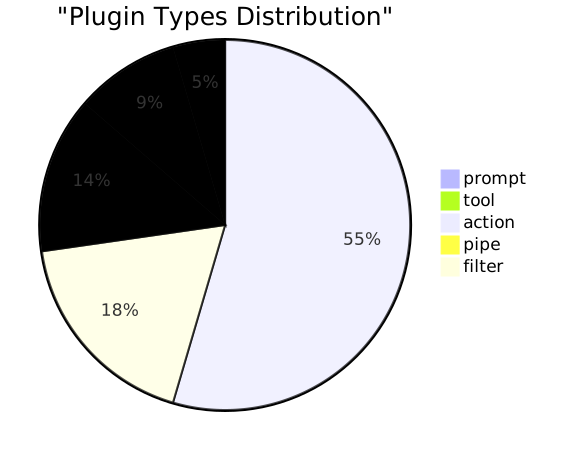
|
||||
|
||||
|
||||
|
||||
## 📈 Overview
|
||||
@@ -26,9 +26,9 @@
|
||||
|
||||
## 📂 By Type
|
||||
|
||||
- 
|
||||
- 
|
||||
- 
|
||||
- 
|
||||
- 
|
||||
- 
|
||||
|
||||
@@ -37,19 +37,19 @@
|
||||
| Rank | Title | Type | Version | Downloads | Views | Upvotes | Saves | Updated |
|
||||
|:---:|------|:---:|:---:|:---:|:---:|:---:|:---:|:---:|
|
||||
| 1 | [Smart Mind Map](https://openwebui.com/posts/turn_any_text_into_beautiful_mind_maps_3094c59a) | action |  |  |  |  |  | 2026-03-22 |
|
||||
| 2 | [Smart Infographic](https://openwebui.com/posts/smart_infographic_ad6f0c7f) | action |  |  |  |  |  | 2026-03-22 |
|
||||
| 2 | [Smart Infographic](https://openwebui.com/posts/smart_infographic_ad6f0c7f) | action |  |  |  |  |  | 2026-03-23 |
|
||||
| 3 | [Markdown Normalizer](https://openwebui.com/posts/markdown_normalizer_baaa8732) | filter |  |  |  |  |  | 2026-03-22 |
|
||||
| 4 | [Async Context Compression](https://openwebui.com/posts/async_context_compression_b1655bc8) | filter |  |  |  |  |  | 2026-03-22 |
|
||||
| 5 | [Export to Word Enhanced](https://openwebui.com/posts/export_to_word_enhanced_formatting_fca6a315) | action |  |  |  |  |  | 2026-03-22 |
|
||||
| 6 | [AI Task Instruction Generator](https://openwebui.com/posts/ai_task_instruction_generator_9bab8b37) | prompt |  |  |  |  |  | 2026-03-22 |
|
||||
| 7 | [Export to Excel](https://openwebui.com/posts/export_mulit_table_to_excel_244b8f9d) | action |  |  |  |  |  | 2026-03-22 |
|
||||
| 8 | [OpenWebUI Skills Manager Tool](https://openwebui.com/posts/openwebui_skills_manager_tool_b4bce8e4) | tool |  |  |  |  |  | 2026-03-22 |
|
||||
| 7 | [OpenWebUI Skills Manager Tool](https://openwebui.com/posts/openwebui_skills_manager_tool_b4bce8e4) | tool |  |  |  |  |  | 2026-03-23 |
|
||||
| 8 | [Export to Excel](https://openwebui.com/posts/export_mulit_table_to_excel_244b8f9d) | action |  |  |  |  |  | 2026-03-22 |
|
||||
| 9 | [GitHub Copilot Official SDK Pipe](https://openwebui.com/posts/github_copilot_official_sdk_pipe_ce96f7b4) | pipe |  |  |  |  |  | 2026-03-22 |
|
||||
| 10 | [Flash Card](https://openwebui.com/posts/flash_card_65a2ea8f) | action |  |  |  |  |  | 2026-03-22 |
|
||||
| 11 | [Deep Dive](https://openwebui.com/posts/deep_dive_c0b846e4) | action |  |  |  |  |  | 2026-01-08 |
|
||||
| 12 | [🧠 Smart Mind Map Tool: Auto-Generate Interactive Knowledge Graphs](https://openwebui.com/posts/smart_mind_map_tool_auto_generate_interactive_know_d25f4e3d) | tool |  |  |  |  |  | 2026-03-05 |
|
||||
| 13 | [导出为Word增强版](https://openwebui.com/posts/导出为_word_支持公式流程图表格和代码块_8a6306c0) | action |  |  |  |  |  | 2026-03-22 |
|
||||
| 14 | [Batch Install Plugins from GitHub](https://openwebui.com/posts/batch_install_plugins_install_popular_plugins_in_s_c9fd6e80) | tool |  |  |  |  |  | 2026-03-22 |
|
||||
| 13 | [Batch Install Plugins from GitHub](https://openwebui.com/posts/batch_install_plugins_install_popular_plugins_in_s_c9fd6e80) | tool |  |  |  |  |  | 2026-03-23 |
|
||||
| 14 | [导出为Word增强版](https://openwebui.com/posts/导出为_word_支持公式流程图表格和代码块_8a6306c0) | action |  |  |  |  |  | 2026-03-22 |
|
||||
| 15 | [📂 Folder Memory – Auto-Evolving Project Context](https://openwebui.com/posts/folder_memory_auto_evolving_project_context_4a9875b2) | filter |  |  |  |  |  | 2026-01-20 |
|
||||
| 16 | [GitHub Copilot SDK Files Filter](https://openwebui.com/posts/github_copilot_sdk_files_filter_403a62ee) | filter |  |  |  |  |  | 2026-03-22 |
|
||||
| 17 | [智能信息图](https://openwebui.com/posts/智能信息图_e04a48ff) | action |  |  |  |  |  | 2026-03-22 |
|
||||
|
||||
@@ -8,7 +8,7 @@
|
||||
> *蓝色: 总下载量 | 紫色: 总浏览量 (实时动态生成)*
|
||||
|
||||
### 📂 内容分类占比 (Distribution)
|
||||

|
||||

|
||||
|
||||
|
||||
## 📈 总览
|
||||
@@ -26,9 +26,9 @@
|
||||
|
||||
## 📂 按类型分类
|
||||
|
||||
- 
|
||||
- 
|
||||
- 
|
||||
- 
|
||||
- 
|
||||
- 
|
||||
|
||||
@@ -37,19 +37,19 @@
|
||||
| 排名 | 标题 | 类型 | 版本 | 下载 | 浏览 | 点赞 | 收藏 | 更新日期 |
|
||||
|:---:|------|:---:|:---:|:---:|:---:|:---:|:---:|:---:|
|
||||
| 1 | [Smart Mind Map](https://openwebui.com/posts/turn_any_text_into_beautiful_mind_maps_3094c59a) | action |  |  |  |  |  | 2026-03-22 |
|
||||
| 2 | [Smart Infographic](https://openwebui.com/posts/smart_infographic_ad6f0c7f) | action |  |  |  |  |  | 2026-03-22 |
|
||||
| 2 | [Smart Infographic](https://openwebui.com/posts/smart_infographic_ad6f0c7f) | action |  |  |  |  |  | 2026-03-23 |
|
||||
| 3 | [Markdown Normalizer](https://openwebui.com/posts/markdown_normalizer_baaa8732) | filter |  |  |  |  |  | 2026-03-22 |
|
||||
| 4 | [Async Context Compression](https://openwebui.com/posts/async_context_compression_b1655bc8) | filter |  |  |  |  |  | 2026-03-22 |
|
||||
| 5 | [Export to Word Enhanced](https://openwebui.com/posts/export_to_word_enhanced_formatting_fca6a315) | action |  |  |  |  |  | 2026-03-22 |
|
||||
| 6 | [AI Task Instruction Generator](https://openwebui.com/posts/ai_task_instruction_generator_9bab8b37) | prompt |  |  |  |  |  | 2026-03-22 |
|
||||
| 7 | [Export to Excel](https://openwebui.com/posts/export_mulit_table_to_excel_244b8f9d) | action |  |  |  |  |  | 2026-03-22 |
|
||||
| 8 | [OpenWebUI Skills Manager Tool](https://openwebui.com/posts/openwebui_skills_manager_tool_b4bce8e4) | tool |  |  |  |  |  | 2026-03-22 |
|
||||
| 7 | [OpenWebUI Skills Manager Tool](https://openwebui.com/posts/openwebui_skills_manager_tool_b4bce8e4) | tool |  |  |  |  |  | 2026-03-23 |
|
||||
| 8 | [Export to Excel](https://openwebui.com/posts/export_mulit_table_to_excel_244b8f9d) | action |  |  |  |  |  | 2026-03-22 |
|
||||
| 9 | [GitHub Copilot Official SDK Pipe](https://openwebui.com/posts/github_copilot_official_sdk_pipe_ce96f7b4) | pipe |  |  |  |  |  | 2026-03-22 |
|
||||
| 10 | [Flash Card](https://openwebui.com/posts/flash_card_65a2ea8f) | action |  |  |  |  |  | 2026-03-22 |
|
||||
| 11 | [Deep Dive](https://openwebui.com/posts/deep_dive_c0b846e4) | action |  |  |  |  |  | 2026-01-08 |
|
||||
| 12 | [🧠 Smart Mind Map Tool: Auto-Generate Interactive Knowledge Graphs](https://openwebui.com/posts/smart_mind_map_tool_auto_generate_interactive_know_d25f4e3d) | tool |  |  |  |  |  | 2026-03-05 |
|
||||
| 13 | [导出为Word增强版](https://openwebui.com/posts/导出为_word_支持公式流程图表格和代码块_8a6306c0) | action |  |  |  |  |  | 2026-03-22 |
|
||||
| 14 | [Batch Install Plugins from GitHub](https://openwebui.com/posts/batch_install_plugins_install_popular_plugins_in_s_c9fd6e80) | tool |  |  |  |  |  | 2026-03-22 |
|
||||
| 13 | [Batch Install Plugins from GitHub](https://openwebui.com/posts/batch_install_plugins_install_popular_plugins_in_s_c9fd6e80) | tool |  |  |  |  |  | 2026-03-23 |
|
||||
| 14 | [导出为Word增强版](https://openwebui.com/posts/导出为_word_支持公式流程图表格和代码块_8a6306c0) | action |  |  |  |  |  | 2026-03-22 |
|
||||
| 15 | [📂 Folder Memory – Auto-Evolving Project Context](https://openwebui.com/posts/folder_memory_auto_evolving_project_context_4a9875b2) | filter |  |  |  |  |  | 2026-01-20 |
|
||||
| 16 | [GitHub Copilot SDK Files Filter](https://openwebui.com/posts/github_copilot_sdk_files_filter_403a62ee) | filter |  |  |  |  |  | 2026-03-22 |
|
||||
| 17 | [智能信息图](https://openwebui.com/posts/智能信息图_e04a48ff) | action |  |  |  |  |  | 2026-03-22 |
|
||||
|
||||
@@ -8,6 +8,19 @@
|
||||
|
||||
A comprehensive thinking lens that dives deep into any content - from context to logic, insights, and action paths.
|
||||
|
||||
## Install with Batch Install Plugins
|
||||
|
||||
If you already use [Batch Install Plugins from GitHub](https://github.com/Fu-Jie/openwebui-extensions/tree/main/plugins/tools/batch-install-plugins), you can install or update this plugin with:
|
||||
|
||||
```text
|
||||
Install plugin from Fu-Jie/openwebui-extensions
|
||||
```
|
||||
|
||||
When the selection dialog opens, search for this plugin, check it, and continue.
|
||||
|
||||
> [!IMPORTANT]
|
||||
> If the official OpenWebUI Community version is already installed, remove it first. After that, Batch Install Plugins can keep this plugin updated in future runs.
|
||||
|
||||
## 🔥 What's New in v1.0.0
|
||||
|
||||
- ✨ **Thinking Chain Structure**: Moves from surface understanding to deep strategic action.
|
||||
|
||||
@@ -8,6 +8,19 @@
|
||||
|
||||
全方位的思维透镜 —— 从背景全景到逻辑脉络,从深度洞察到行动路径。
|
||||
|
||||
## 使用 Batch Install Plugins 安装
|
||||
|
||||
如果你已经安装了 [Batch Install Plugins from GitHub](https://github.com/Fu-Jie/openwebui-extensions/tree/main/plugins/tools/batch-install-plugins),可以用下面这句来安装或更新当前插件:
|
||||
|
||||
```text
|
||||
从 Fu-Jie/openwebui-extensions 安装插件
|
||||
```
|
||||
|
||||
当选择弹窗打开后,搜索当前插件,勾选后继续安装即可。
|
||||
|
||||
> [!IMPORTANT]
|
||||
> 如果你已经安装了 OpenWebUI 官方社区里的同名版本,请先删除旧版本,否则重新安装时可能报错。删除后,Batch Install Plugins 后续就可以继续负责更新这个插件。
|
||||
|
||||
## 🔥 v1.0.0 更新内容
|
||||
|
||||
- ✨ **思维链结构**: 从表面理解一步步深入到战略行动。
|
||||
|
||||
@@ -8,6 +8,19 @@
|
||||
|
||||
Export conversation to Word (.docx) with **syntax highlighting**, **native math equations**, **Mermaid diagrams**, **citations**, and **enhanced table formatting**.
|
||||
|
||||
## Install with Batch Install Plugins
|
||||
|
||||
If you already use [Batch Install Plugins from GitHub](https://github.com/Fu-Jie/openwebui-extensions/tree/main/plugins/tools/batch-install-plugins), you can install or update this plugin with:
|
||||
|
||||
```text
|
||||
Install plugin from Fu-Jie/openwebui-extensions
|
||||
```
|
||||
|
||||
When the selection dialog opens, search for this plugin, check it, and continue.
|
||||
|
||||
> [!IMPORTANT]
|
||||
> If the official OpenWebUI Community version is already installed, remove it first. After that, Batch Install Plugins can keep this plugin updated in future runs.
|
||||
|
||||
## 🔥 What's New in v0.4.4
|
||||
|
||||
- 🧹 **Content Cleanup**: Enhanced stripping of `<details>` blocks (often used for tool calls/thinking process) to ensure a clean final document.
|
||||
|
||||
@@ -8,6 +8,19 @@
|
||||
|
||||
将对话导出为 Word (.docx),支持**代码语法高亮**、**原生数学公式**、**Mermaid 图表**、**引用参考**和**增强表格格式**。
|
||||
|
||||
## 使用 Batch Install Plugins 安装
|
||||
|
||||
如果你已经安装了 [Batch Install Plugins from GitHub](https://github.com/Fu-Jie/openwebui-extensions/tree/main/plugins/tools/batch-install-plugins),可以用下面这句来安装或更新当前插件:
|
||||
|
||||
```text
|
||||
从 Fu-Jie/openwebui-extensions 安装插件
|
||||
```
|
||||
|
||||
当选择弹窗打开后,搜索当前插件,勾选后继续安装即可。
|
||||
|
||||
> [!IMPORTANT]
|
||||
> 如果你已经安装了 OpenWebUI 官方社区里的同名版本,请先删除旧版本,否则重新安装时可能报错。删除后,Batch Install Plugins 后续就可以继续负责更新这个插件。
|
||||
|
||||
## 🔥 v0.4.4 更新内容
|
||||
|
||||
- 🧹 **内容清理加强**: 增强了对 `<details>` 块(通常包含工具调用或思考过程)的清理,确保最终文档整洁。
|
||||
|
||||
@@ -8,6 +8,19 @@
|
||||
|
||||
Export chat history to an Excel (.xlsx) file directly from the chat interface.
|
||||
|
||||
## Install with Batch Install Plugins
|
||||
|
||||
If you already use [Batch Install Plugins from GitHub](https://github.com/Fu-Jie/openwebui-extensions/tree/main/plugins/tools/batch-install-plugins), you can install or update this plugin with:
|
||||
|
||||
```text
|
||||
Install plugin from Fu-Jie/openwebui-extensions
|
||||
```
|
||||
|
||||
When the selection dialog opens, search for this plugin, check it, and continue.
|
||||
|
||||
> [!IMPORTANT]
|
||||
> If the official OpenWebUI Community version is already installed, remove it first. After that, Batch Install Plugins can keep this plugin updated in future runs.
|
||||
|
||||
## 🔥 What's New in v0.3.6
|
||||
|
||||
- **OpenWebUI-Style Theme**: Modern dark header (#1f2937) with light gray zebra striping for better readability.
|
||||
|
||||
@@ -8,6 +8,19 @@
|
||||
|
||||
将对话历史直接导出为 Excel (.xlsx) 文件。
|
||||
|
||||
## 使用 Batch Install Plugins 安装
|
||||
|
||||
如果你已经安装了 [Batch Install Plugins from GitHub](https://github.com/Fu-Jie/openwebui-extensions/tree/main/plugins/tools/batch-install-plugins),可以用下面这句来安装或更新当前插件:
|
||||
|
||||
```text
|
||||
从 Fu-Jie/openwebui-extensions 安装插件
|
||||
```
|
||||
|
||||
当选择弹窗打开后,搜索当前插件,勾选后继续安装即可。
|
||||
|
||||
> [!IMPORTANT]
|
||||
> 如果你已经安装了 OpenWebUI 官方社区里的同名版本,请先删除旧版本,否则重新安装时可能报错。删除后,Batch Install Plugins 后续就可以继续负责更新这个插件。
|
||||
|
||||
## 🔥 最新更新 v0.3.6
|
||||
|
||||
- **OpenWebUI 风格主题**:现代深灰表头(#1f2937)与浅灰斑马纹,提升可读性。
|
||||
|
||||
@@ -8,6 +8,19 @@ Generate polished learning flashcards from any text—title, summary, key points
|
||||
|  |  |  |  |  |  |  |
|
||||
| :---: | :---: | :---: | :---: | :---: | :---: | :---: |
|
||||
|
||||
## Install with Batch Install Plugins
|
||||
|
||||
If you already use [Batch Install Plugins from GitHub](https://github.com/Fu-Jie/openwebui-extensions/tree/main/plugins/tools/batch-install-plugins), you can install or update this plugin with:
|
||||
|
||||
```text
|
||||
Install plugin from Fu-Jie/openwebui-extensions
|
||||
```
|
||||
|
||||
When the selection dialog opens, search for this plugin, check it, and continue.
|
||||
|
||||
> [!IMPORTANT]
|
||||
> If the official OpenWebUI Community version is already installed, remove it first. After that, Batch Install Plugins can keep this plugin updated in future runs.
|
||||
|
||||
## What's New
|
||||
|
||||
### v0.2.4
|
||||
|
||||
@@ -8,6 +8,19 @@
|
||||
|  |  |  |  |  |  |  |
|
||||
| :---: | :---: | :---: | :---: | :---: | :---: | :---: |
|
||||
|
||||
## 使用 Batch Install Plugins 安装
|
||||
|
||||
如果你已经安装了 [Batch Install Plugins from GitHub](https://github.com/Fu-Jie/openwebui-extensions/tree/main/plugins/tools/batch-install-plugins),可以用下面这句来安装或更新当前插件:
|
||||
|
||||
```text
|
||||
从 Fu-Jie/openwebui-extensions 安装插件
|
||||
```
|
||||
|
||||
当选择弹窗打开后,搜索当前插件,勾选后继续安装即可。
|
||||
|
||||
> [!IMPORTANT]
|
||||
> 如果你已经安装了 OpenWebUI 官方社区里的同名版本,请先删除旧版本,否则重新安装时可能报错。删除后,Batch Install Plugins 后续就可以继续负责更新这个插件。
|
||||
|
||||
## 🔥 最新更新 v0.2.4
|
||||
|
||||
* **输出优化**: 移除输出中的调试信息。
|
||||
|
||||
@@ -8,6 +8,19 @@
|
||||
|
||||
An Open WebUI plugin powered by the AntV Infographic engine. It transforms long text into professional, beautiful infographics with a single click.
|
||||
|
||||
## Install with Batch Install Plugins
|
||||
|
||||
If you already use [Batch Install Plugins from GitHub](https://github.com/Fu-Jie/openwebui-extensions/tree/main/plugins/tools/batch-install-plugins), you can install or update this plugin with:
|
||||
|
||||
```text
|
||||
Install plugin from Fu-Jie/openwebui-extensions
|
||||
```
|
||||
|
||||
When the selection dialog opens, search for this plugin, check it, and continue.
|
||||
|
||||
> [!IMPORTANT]
|
||||
> If the official OpenWebUI Community version is already installed, remove it first. After that, Batch Install Plugins can keep this plugin updated in future runs.
|
||||
|
||||
## 🔥 What's New in v1.6.0
|
||||
|
||||
- 🌐 **Smart Language Detection**: Automatically detects the accurate UI language from your browser.
|
||||
|
||||
@@ -8,6 +8,19 @@
|
||||
|
||||
基于 AntV Infographic 引擎的 Open WebUI 插件,能够将长文本内容一键转换为专业、美观的信息图表。
|
||||
|
||||
## 使用 Batch Install Plugins 安装
|
||||
|
||||
如果你已经安装了 [Batch Install Plugins from GitHub](https://github.com/Fu-Jie/openwebui-extensions/tree/main/plugins/tools/batch-install-plugins),可以用下面这句来安装或更新当前插件:
|
||||
|
||||
```text
|
||||
从 Fu-Jie/openwebui-extensions 安装插件
|
||||
```
|
||||
|
||||
当选择弹窗打开后,搜索当前插件,勾选后继续安装即可。
|
||||
|
||||
> [!IMPORTANT]
|
||||
> 如果你已经安装了 OpenWebUI 官方社区里的同名版本,请先删除旧版本,否则重新安装时可能报错。删除后,Batch Install Plugins 后续就可以继续负责更新这个插件。
|
||||
|
||||
## 🔥 最新更新 v1.6.0
|
||||
|
||||
- 🌐 **智能语言检测**:自动从浏览器准确识别当前界面语言设置。
|
||||
|
||||
@@ -10,6 +10,19 @@ Smart Mind Map is a powerful OpenWebUI action plugin that intelligently analyzes
|
||||
|
||||
> 🏆 **Featured by OpenWebUI Official** — This plugin was recommended in the official OpenWebUI Community Newsletter: [February 3, 2026](https://openwebui.com/blog/open-webui-community-newsletter-february-3rd-2026)
|
||||
|
||||
## Install with Batch Install Plugins
|
||||
|
||||
If you already use [Batch Install Plugins from GitHub](https://github.com/Fu-Jie/openwebui-extensions/tree/main/plugins/tools/batch-install-plugins), you can install or update this plugin with:
|
||||
|
||||
```text
|
||||
Install plugin from Fu-Jie/openwebui-extensions
|
||||
```
|
||||
|
||||
When the selection dialog opens, search for this plugin, check it, and continue.
|
||||
|
||||
> [!IMPORTANT]
|
||||
> If the official OpenWebUI Community version is already installed, remove it first. After that, Batch Install Plugins can keep this plugin updated in future runs.
|
||||
|
||||
## What's New in v1.0.0
|
||||
|
||||
### Direct Embed & UI Refinements
|
||||
|
||||
@@ -10,6 +10,19 @@
|
||||
|
||||
> 🏆 **OpenWebUI 官方推荐** — 本插件获得 OpenWebUI 社区 Newsletter 官方推荐:[2026 年 2 月 3 日](https://openwebui.com/blog/open-webui-community-newsletter-february-3rd-2026)
|
||||
|
||||
## 使用 Batch Install Plugins 安装
|
||||
|
||||
如果你已经安装了 [Batch Install Plugins from GitHub](https://github.com/Fu-Jie/openwebui-extensions/tree/main/plugins/tools/batch-install-plugins),可以用下面这句来安装或更新当前插件:
|
||||
|
||||
```text
|
||||
从 Fu-Jie/openwebui-extensions 安装插件
|
||||
```
|
||||
|
||||
当选择弹窗打开后,搜索当前插件,勾选后继续安装即可。
|
||||
|
||||
> [!IMPORTANT]
|
||||
> 如果你已经安装了 OpenWebUI 官方社区里的同名版本,请先删除旧版本,否则重新安装时可能报错。删除后,Batch Install Plugins 后续就可以继续负责更新这个插件。
|
||||
|
||||
## v1.0.0 最新更新
|
||||
|
||||
### 嵌入式直出与 UI 细节全线重构
|
||||
|
||||
@@ -1,6 +1,6 @@
|
||||
# Async Context Compression Filter
|
||||
|
||||
| By [Fu-Jie](https://github.com/Fu-Jie) · v1.5.0 | [⭐ Star this repo](https://github.com/Fu-Jie/openwebui-extensions) |
|
||||
| By [Fu-Jie](https://github.com/Fu-Jie) · v1.6.0 | [⭐ Star this repo](https://github.com/Fu-Jie/openwebui-extensions) |
|
||||
| :--- | ---: |
|
||||
|
||||
|  |  |  |  |  |  |  |
|
||||
@@ -8,6 +8,25 @@
|
||||
|
||||
This filter reduces token consumption in long conversations through intelligent summarization and message compression while keeping conversations coherent.
|
||||
|
||||
## Install with Batch Install Plugins
|
||||
|
||||
If you already use [Batch Install Plugins from GitHub](https://github.com/Fu-Jie/openwebui-extensions/tree/main/plugins/tools/batch-install-plugins), you can install or update this plugin with:
|
||||
|
||||
```text
|
||||
Install plugin from Fu-Jie/openwebui-extensions
|
||||
```
|
||||
|
||||
When the selection dialog opens, search for this plugin, check it, and continue.
|
||||
|
||||
> [!IMPORTANT]
|
||||
> If the official OpenWebUI Community version is already installed, remove it first. After that, Batch Install Plugins can keep this plugin updated in future runs.
|
||||
|
||||
## What's new in 1.6.0
|
||||
|
||||
- **Fixed `keep_first` Logic**: Re-defined `keep_first` to protect the first N **non-system** messages plus all interleaved system messages. This ensures initial context (e.g., identity, task instructions) is preserved correctly.
|
||||
- **Absolute System Message Protection**: System messages are now strictly excluded from compression. Any system message encountered in the history (even late-injected ones) is preserved as an original message in the final context.
|
||||
- **Improved Context Assembly**: Summaries now only target User and Assistant dialogue, ensuring that system instructions injected by other plugins are never "eaten" by the summarizer.
|
||||
|
||||
## What's new in 1.5.0
|
||||
|
||||
- **External Chat Reference Summaries**: Added support for referenced chat context blocks that can reuse cached summaries, inject small referenced chats directly, or generate summaries for larger referenced chats before injection.
|
||||
@@ -41,6 +60,10 @@ This filter reduces token consumption in long conversations through intelligent
|
||||
|
||||
## What This Fixes
|
||||
|
||||
- **Problem: System Messages being summarized/lost.**
|
||||
Previously, the filter could include system messages (especially those injected late by other plugins) in its summarization zone, causing important instructions to be lost. Now, all system messages are strictly preserved in their original role and never summarized.
|
||||
- **Problem: Incorrect `keep_first` behavior.**
|
||||
Previously, `keep_first` simply took the first $N$ messages. If those were only system messages, the initial user/assistant messages (which are often important for context) would be summarized. Now, `keep_first` ensures that $N$ non-system messages are protected.
|
||||
- **Problem 1: A referenced chat could break the current request.**
|
||||
Before, if the filter needed to summarize a referenced chat and that LLM call failed, the current chat could fail with it. Now it degrades gracefully and injects direct context instead.
|
||||
- **Problem 2: Some referenced chats were being cut too aggressively.**
|
||||
@@ -128,7 +151,7 @@ flowchart TD
|
||||
| `priority` | `10` | Execution order; lower runs earlier. |
|
||||
| `compression_threshold_tokens` | `64000` | Trigger asynchronous summary when total tokens exceed this value. Set to 50%-70% of your model's context window. |
|
||||
| `max_context_tokens` | `128000` | Hard cap for context; older messages (except protected ones) are dropped if exceeded. |
|
||||
| `keep_first` | `1` | Always keep the first N messages (protects system prompts). |
|
||||
| `keep_first` | `1` | Number of initial **non-system** messages to always keep (plus all preceding system prompts). |
|
||||
| `keep_last` | `6` | Always keep the last N messages to preserve recent context. |
|
||||
| `summary_model` | `None` | Model for summaries. Strongly recommended to set a fast, economical model (e.g., `gemini-2.5-flash`, `deepseek-v3`). Falls back to the current chat model when empty. |
|
||||
| `summary_model_max_context` | `0` | Input context window used to fit summary requests. If `0`, falls back to `model_thresholds` or global `max_context_tokens`. |
|
||||
|
||||
@@ -1,6 +1,6 @@
|
||||
# 异步上下文压缩过滤器
|
||||
|
||||
| 作者:[Fu-Jie](https://github.com/Fu-Jie) · v1.5.0 | [⭐ 点个 Star 支持项目](https://github.com/Fu-Jie/openwebui-extensions) |
|
||||
| 作者:[Fu-Jie](https://github.com/Fu-Jie) · v1.6.0 | [⭐ 点个 Star 支持项目](https://github.com/Fu-Jie/openwebui-extensions) |
|
||||
| :--- | ---: |
|
||||
|
||||
|  |  |  |  |  |  |  |
|
||||
@@ -10,6 +10,25 @@
|
||||
|
||||
本过滤器通过智能摘要和消息压缩技术,在保持对话连贯性的同时,显著降低长对话的 Token 消耗。
|
||||
|
||||
## 使用 Batch Install Plugins 安装
|
||||
|
||||
如果你已经安装了 [Batch Install Plugins from GitHub](https://github.com/Fu-Jie/openwebui-extensions/tree/main/plugins/tools/batch-install-plugins),可以用下面这句来安装或更新当前插件:
|
||||
|
||||
```text
|
||||
从 Fu-Jie/openwebui-extensions 安装插件
|
||||
```
|
||||
|
||||
当选择弹窗打开后,搜索当前插件,勾选后继续安装即可。
|
||||
|
||||
> [!IMPORTANT]
|
||||
> 如果你已经安装了 OpenWebUI 官方社区里的同名版本,请先删除旧版本,否则重新安装时可能报错。删除后,Batch Install Plugins 后续就可以继续负责更新这个插件。
|
||||
|
||||
## 1.6.0 版本更新
|
||||
|
||||
- **修正 `keep_first` 逻辑**:重新定义了 `keep_first` 的功能,现在它负责保护前 N 条**非系统消息**(以及它们之前的所有系统提示词)。这确保了初始对话背景(如身份设定、任务说明)能被正确保留。
|
||||
- **系统消息绝对保护**:系统消息现在被严格排除在压缩范围之外。历史记录中遇到的任何系统消息(甚至是后期注入的消息)都会作为原始消息保留在最终上下文中。
|
||||
- **改进的上下文组装**:摘要现在仅针对用户和助手的对话,确保其他插件注入的系统指令永远不会被摘要器“吃掉”。
|
||||
|
||||
## 1.5.0 版本更新
|
||||
|
||||
- **外部聊天引用摘要**: 新增对引用聊天上下文的摘要支持。现在可以复用缓存摘要、直接注入较小引用聊天,或先为较大的引用聊天生成摘要再注入。
|
||||
@@ -39,12 +58,14 @@
|
||||
- ✅ **智能模型匹配**: 自定义模型自动继承基础模型的阈值配置。
|
||||
- ⚠ **多模态支持**: 图片内容会被保留,但其 Token **不参与计算**。请相应调整阈值。
|
||||
|
||||
详细的工作原理和更长说明仍可参考 [工作流程指南](https://github.com/Fu-Jie/openwebui-extensions/blob/main/plugins/filters/async-context-compression/WORKFLOW_GUIDE_CN.md)。
|
||||
|
||||
---
|
||||
|
||||
## 这次解决了什么问题(通俗版)
|
||||
|
||||
- **问题:系统消息被摘要或丢失。**
|
||||
以前,过滤器可能会将被引用或后期注入的系统消息包含在摘要区域内,导致重要的指令丢失。现在,所有系统消息都严格按原样保留,永不被摘要。
|
||||
- **问题:`keep_first` 逻辑不符合预期。**
|
||||
以前 `keep_first` 只是简单提取前 N 条消息。如果前几条全是系统消息,初始的问答(通常对上下文很重要)就会被压缩掉。现在 `keep_first` 确保保护 N 条非系统消息。
|
||||
- **问题 1:引用别的聊天时,摘要失败可能把当前对话一起弄挂。**
|
||||
以前如果过滤器需要先帮被引用聊天做摘要,而这一步的 LLM 调用失败了,当前请求也可能直接失败。现在改成了“能摘要就摘要,失败就退回直接塞上下文”,当前对话不会被一起拖死。
|
||||
- **问题 2:有些被引用聊天被截得太早,信息丢得太多。**
|
||||
@@ -72,11 +93,11 @@ flowchart TD
|
||||
F -- 是 --> G[直接复用缓存摘要]
|
||||
F -- 否 --> H{能直接放进当前预算?}
|
||||
H -- 是 --> I[直接注入完整引用聊天文本]
|
||||
H -- 否 --> J[准备引用聊天的摘要输入]
|
||||
H -- No --> J[准备引用聊天的摘要输入]
|
||||
|
||||
J --> K{引用聊天摘要调用成功?}
|
||||
K -- 是 --> L[注入生成后的引用摘要]
|
||||
K -- 否 --> M[回退为直接注入上下文]
|
||||
K -- No --> M[回退为直接注入上下文]
|
||||
|
||||
G --> D
|
||||
I --> D
|
||||
@@ -136,7 +157,7 @@ flowchart TD
|
||||
| `priority` | `10` | 过滤器执行顺序,数值越小越先执行。 |
|
||||
| `compression_threshold_tokens` | `64000` | **重要**: 当上下文总 Token 超过此值时后台生成摘要,建议设为模型上下文窗口的 50%-70%。 |
|
||||
| `max_context_tokens` | `128000` | **重要**: 上下文硬上限,超过即移除最早消息(保留受保护消息)。 |
|
||||
| `keep_first` | `1` | 始终保留对话开始的 N 条消息,保护系统提示或环境变量。 |
|
||||
| `keep_first` | `1` | 始终保留对话开始的 N 条**非系统消息**(以及它们之前的所有系统提示词)。 |
|
||||
| `keep_last` | `6` | 始终保留对话末尾的 N 条消息,确保最近上下文连贯。 |
|
||||
|
||||
### 摘要生成配置
|
||||
|
||||
@@ -2,6 +2,19 @@
|
||||
|
||||
A specialized filter for OpenWebUI that displays real-time metadata (display name, token capacity, and remaining quota) for models managed via the Antigravity Auth API.
|
||||
|
||||
## Install with Batch Install Plugins
|
||||
|
||||
If you already use [Batch Install Plugins from GitHub](https://github.com/Fu-Jie/openwebui-extensions/tree/main/plugins/tools/batch-install-plugins), you can install or update this plugin with:
|
||||
|
||||
```text
|
||||
Install "Auth Model Info Filter" from Fu-Jie/openwebui-extensions
|
||||
```
|
||||
|
||||
When the selection dialog opens, confirm this plugin and continue.
|
||||
|
||||
> [!IMPORTANT]
|
||||
> If the official OpenWebUI Community version is already installed, remove it first. After that, Batch Install Plugins can keep this plugin updated in future runs.
|
||||
|
||||
## Features
|
||||
|
||||
- **Automatic Metadata Injection**: Displays model details in the status bar of the chat interface.
|
||||
|
||||
@@ -2,6 +2,19 @@
|
||||
|
||||
一个专为 OpenWebUI 设计的过滤器插件,用于显示通过 Antigravity Auth API 管理的模型的实时元数据(显示名称、Token 容量和剩余配额)。
|
||||
|
||||
## 使用 Batch Install Plugins 安装
|
||||
|
||||
如果你已经安装了 [Batch Install Plugins from GitHub](https://github.com/Fu-Jie/openwebui-extensions/tree/main/plugins/tools/batch-install-plugins),可以用下面这句来安装或更新当前插件:
|
||||
|
||||
```text
|
||||
从 Fu-Jie/openwebui-extensions 安装“模型授权信息过滤器 (Auth Model Info Filter)”
|
||||
```
|
||||
|
||||
当选择弹窗打开后,确认当前插件并继续安装即可。
|
||||
|
||||
> [!IMPORTANT]
|
||||
> 如果你已经安装了 OpenWebUI 官方社区里的同名版本,请先删除旧版本,否则重新安装时可能报错。删除后,Batch Install Plugins 后续就可以继续负责更新这个插件。
|
||||
|
||||
## 功能特性
|
||||
|
||||
- **自动元数据注入**: 在聊天界面的状态栏显示模型详细信息。
|
||||
|
||||
@@ -8,6 +8,19 @@
|
||||
|
||||
Automatically tracks and persists the mapping between user IDs and chat IDs for seamless session management.
|
||||
|
||||
## Install with Batch Install Plugins
|
||||
|
||||
If you already use [Batch Install Plugins from GitHub](https://github.com/Fu-Jie/openwebui-extensions/tree/main/plugins/tools/batch-install-plugins), you can install or update this plugin with:
|
||||
|
||||
```text
|
||||
Install plugin from Fu-Jie/openwebui-extensions
|
||||
```
|
||||
|
||||
When the selection dialog opens, search for this plugin, check it, and continue.
|
||||
|
||||
> [!IMPORTANT]
|
||||
> If the official OpenWebUI Community version is already installed, remove it first. After that, Batch Install Plugins can keep this plugin updated in future runs.
|
||||
|
||||
## Key Features
|
||||
|
||||
🔄 **Automatic Tracking** - Captures user_id and chat_id on every message without manual intervention
|
||||
|
||||
@@ -8,6 +8,19 @@
|
||||
|
||||
自动追踪并持久化用户 ID 与聊天 ID 的映射关系,实现无缝的会话管理。
|
||||
|
||||
## 使用 Batch Install Plugins 安装
|
||||
|
||||
如果你已经安装了 [Batch Install Plugins from GitHub](https://github.com/Fu-Jie/openwebui-extensions/tree/main/plugins/tools/batch-install-plugins),可以用下面这句来安装或更新当前插件:
|
||||
|
||||
```text
|
||||
从 Fu-Jie/openwebui-extensions 安装插件
|
||||
```
|
||||
|
||||
当选择弹窗打开后,搜索当前插件,勾选后继续安装即可。
|
||||
|
||||
> [!IMPORTANT]
|
||||
> 如果你已经安装了 OpenWebUI 官方社区里的同名版本,请先删除旧版本,否则重新安装时可能报错。删除后,Batch Install Plugins 后续就可以继续负责更新这个插件。
|
||||
|
||||
## 核心功能
|
||||
|
||||
🔄 **自动追踪** - 无需手动干预,在每条消息上自动捕获 user_id 和 chat_id
|
||||
|
||||
@@ -8,6 +8,19 @@
|
||||
|
||||
**Folder Memory** is an intelligent context filter plugin for OpenWebUI. It automatically extracts consistent "Project Rules" from ongoing conversations within a folder and injects them back into the folder's system prompt.
|
||||
|
||||
## Install with Batch Install Plugins
|
||||
|
||||
If you already use [Batch Install Plugins from GitHub](https://github.com/Fu-Jie/openwebui-extensions/tree/main/plugins/tools/batch-install-plugins), you can install or update this plugin with:
|
||||
|
||||
```text
|
||||
Install plugin from Fu-Jie/openwebui-extensions
|
||||
```
|
||||
|
||||
When the selection dialog opens, search for this plugin, check it, and continue.
|
||||
|
||||
> [!IMPORTANT]
|
||||
> If the official OpenWebUI Community version is already installed, remove it first. After that, Batch Install Plugins can keep this plugin updated in future runs.
|
||||
|
||||
## 🔥 What's New in v0.1.0
|
||||
|
||||
- **Initial Release**: Automated "Project Rules" management for OpenWebUI folders.
|
||||
|
||||
@@ -10,6 +10,19 @@
|
||||
|
||||
这确保了该文件夹内的所有未来对话都能共享相同的进化上下文和规则,无需手动更新。
|
||||
|
||||
## 使用 Batch Install Plugins 安装
|
||||
|
||||
如果你已经安装了 [Batch Install Plugins from GitHub](https://github.com/Fu-Jie/openwebui-extensions/tree/main/plugins/tools/batch-install-plugins),可以用下面这句来安装或更新当前插件:
|
||||
|
||||
```text
|
||||
从 Fu-Jie/openwebui-extensions 安装插件
|
||||
```
|
||||
|
||||
当选择弹窗打开后,搜索当前插件,勾选后继续安装即可。
|
||||
|
||||
> [!IMPORTANT]
|
||||
> 如果你已经安装了 OpenWebUI 官方社区里的同名版本,请先删除旧版本,否则重新安装时可能报错。删除后,Batch Install Plugins 后续就可以继续负责更新这个插件。
|
||||
|
||||
## 🔥 最新更新 v0.1.0
|
||||
|
||||
- **首个版本发布**:专注于自动化的“项目规则”管理。
|
||||
|
||||
@@ -10,6 +10,19 @@ This is a dedicated **companion filter plugin** designed specifically for the [G
|
||||
|
||||
Its core mission is to **protect user-uploaded files from being "pre-processed" by the OpenWebUI core system, ensuring that the Copilot Agent receives the raw files for autonomous analysis.**
|
||||
|
||||
## Install with Batch Install Plugins
|
||||
|
||||
If you already use [Batch Install Plugins from GitHub](https://github.com/Fu-Jie/openwebui-extensions/tree/main/plugins/tools/batch-install-plugins), you can install or update this plugin with:
|
||||
|
||||
```text
|
||||
Install plugin from Fu-Jie/openwebui-extensions
|
||||
```
|
||||
|
||||
When the selection dialog opens, search for this plugin, check it, and continue.
|
||||
|
||||
> [!IMPORTANT]
|
||||
> If the official OpenWebUI Community version is already installed, remove it first. After that, Batch Install Plugins can keep this plugin updated in future runs.
|
||||
|
||||
## ✨ v0.1.3 Updates (What's New)
|
||||
|
||||
- **🔍 BYOK Model ID Matching Fixed**: Now correctly identifies models in `github_copilot_official_sdk_pipe.xxx` format via prefix matching, in addition to keyword fallback for backward compatibility. (v0.1.3)
|
||||
|
||||
@@ -10,6 +10,19 @@
|
||||
|
||||
它的核心使命是:**保护用户上传的文件不被 OpenWebUI 核心系统“抢先处理”,确保 Copilot Agent 能够接收到原始文件并进行自主分析。**
|
||||
|
||||
## 使用 Batch Install Plugins 安装
|
||||
|
||||
如果你已经安装了 [Batch Install Plugins from GitHub](https://github.com/Fu-Jie/openwebui-extensions/tree/main/plugins/tools/batch-install-plugins),可以用下面这句来安装或更新当前插件:
|
||||
|
||||
```text
|
||||
从 Fu-Jie/openwebui-extensions 安装插件
|
||||
```
|
||||
|
||||
当选择弹窗打开后,搜索当前插件,勾选后继续安装即可。
|
||||
|
||||
> [!IMPORTANT]
|
||||
> 如果你已经安装了 OpenWebUI 官方社区里的同名版本,请先删除旧版本,否则重新安装时可能报错。删除后,Batch Install Plugins 后续就可以继续负责更新这个插件。
|
||||
|
||||
## ✨ 0.1.3 更新内容 (What's New)
|
||||
|
||||
- **🔍 BYOK 模型 ID 匹配修复**: 新增前缀匹配(`github_copilot_official_sdk_pipe.xxx` 格式),修复 BYOK 模型无法被正确识别的问题,关键词兜底保持向后兼容。(v0.1.3)
|
||||
|
||||
@@ -22,7 +22,7 @@ Filters act as middleware in the message pipeline:
|
||||
|
||||
Reduces token consumption in long conversations with safer summary fallbacks and clearer failure visibility.
|
||||
|
||||
**Version:** 1.5.0
|
||||
**Version:** 1.6.0
|
||||
|
||||
[:octicons-arrow-right-24: Documentation](async-context-compression.md)
|
||||
|
||||
|
||||
@@ -22,7 +22,7 @@ Filter 充当消息管线中的中间件:
|
||||
|
||||
通过更稳健的摘要回退和更清晰的失败提示,降低长对话的 token 消耗并保持连贯性。
|
||||
|
||||
**版本:** 1.5.0
|
||||
**版本:** 1.6.0
|
||||
|
||||
[:octicons-arrow-right-24: 查看文档](async-context-compression.zh.md)
|
||||
|
||||
|
||||
@@ -13,6 +13,19 @@ A powerful, context-aware content normalizer filter for Open WebUI designed to f
|
||||
|
||||
---
|
||||
|
||||
## Install with Batch Install Plugins
|
||||
|
||||
If you already use [Batch Install Plugins from GitHub](https://github.com/Fu-Jie/openwebui-extensions/tree/main/plugins/tools/batch-install-plugins), you can install or update this plugin with:
|
||||
|
||||
```text
|
||||
Install plugin from Fu-Jie/openwebui-extensions
|
||||
```
|
||||
|
||||
When the selection dialog opens, search for this plugin, check it, and continue.
|
||||
|
||||
> [!IMPORTANT]
|
||||
> If the official OpenWebUI Community version is already installed, remove it first. After that, Batch Install Plugins can keep this plugin updated in future runs.
|
||||
|
||||
## 🔥 What's New in v1.2.8
|
||||
* **Safe-by-Default Strategy**: The `enable_escape_fix` feature is now **disabled by default**. This prevents unwanted modifications to valid technical text like Windows file paths (`C:\new\test`) or complex LaTeX formulas.
|
||||
* **LaTeX Parsing Fix**: Improved the logic for identifying display math (`$$ ... $$`). Fixed a bug where LaTeX commands starting with `\n` (like `\nabla`) were incorrectly treated as newlines.
|
||||
|
||||
@@ -14,6 +14,19 @@
|
||||
|
||||
---
|
||||
|
||||
## 使用 Batch Install Plugins 安装
|
||||
|
||||
如果你已经安装了 [Batch Install Plugins from GitHub](https://github.com/Fu-Jie/openwebui-extensions/tree/main/plugins/tools/batch-install-plugins),可以用下面这句来安装或更新当前插件:
|
||||
|
||||
```text
|
||||
从 Fu-Jie/openwebui-extensions 安装插件
|
||||
```
|
||||
|
||||
当选择弹窗打开后,搜索当前插件,勾选后继续安装即可。
|
||||
|
||||
> [!IMPORTANT]
|
||||
> 如果你已经安装了 OpenWebUI 官方社区里的同名版本,请先删除旧版本,否则重新安装时可能报错。删除后,Batch Install Plugins 后续就可以继续负责更新这个插件。
|
||||
|
||||
## 🔥 最新更新 v1.2.8
|
||||
* **“默认安全”策略 (Safe-by-Default)**:`enable_escape_fix` 功能现在**默认禁用**。这能有效防止插件在未经授权的情况下误改 Windows 路径 (`C:\new\test`) 或复杂的 LaTeX 公式。
|
||||
* **LaTeX 解析优化**:重构了显示数学公式 (`$$ ... $$`) 的识别逻辑。修复了 LaTeX 命令如果以 `\n` 开头(如 `\nabla`)会被错误识别为换行符的 Bug。
|
||||
|
||||
@@ -8,6 +8,23 @@
|
||||
|
||||
One-click batch install plugins from GitHub repositories to your OpenWebUI instance.
|
||||
|
||||
## Install with Batch Install Plugins
|
||||
|
||||
After you install [Batch Install Plugins from GitHub](https://openwebui.com/posts/batch_install_plugins_install_popular_plugins_in_s_c9fd6e80) once, you can also use it to reinstall or update itself with:
|
||||
|
||||
```text
|
||||
Install plugin from Fu-Jie/openwebui-extensions
|
||||
```
|
||||
|
||||
When the selection dialog opens, search for this plugin, check it, and continue.
|
||||
|
||||
> [!IMPORTANT]
|
||||
> If the official OpenWebUI Community version is already installed, remove it first. After that, Batch Install Plugins can keep this plugin updated in future runs.
|
||||
|
||||
> [!TIP]
|
||||
> **💡 Looking to batch install or manage Workspace Skills?**
|
||||
> This plugin specializes in installing global function-based plugins (Pipe, Filter, Tool, Action). If you need to manage your AI assistant's dedicated Skills, use our companion tool [OpenWebUI Skills Manager](https://openwebui.com/posts/openwebui_skills_manager_tool_b4bce8e4), which provides full CRUD capabilities, batch discovery, and interactive selection dialogs.
|
||||
|
||||
## Key Features
|
||||
|
||||
- **One-Click Install**: Install all plugins with a single command
|
||||
|
||||
@@ -8,6 +8,23 @@
|
||||
|
||||
一键将 GitHub 仓库中的插件批量安装到你的 OpenWebUI 实例。
|
||||
|
||||
## 使用 Batch Install Plugins 安装
|
||||
|
||||
当你已经安装过一次 [Batch Install Plugins from GitHub](https://openwebui.com/posts/batch_install_plugins_install_popular_plugins_in_s_c9fd6e80) 后,也可以用同一句来重新安装或更新它自己:
|
||||
|
||||
```text
|
||||
从 Fu-Jie/openwebui-extensions 安装插件
|
||||
```
|
||||
|
||||
当选择弹窗打开后,搜索当前插件,勾选后继续安装即可。
|
||||
|
||||
> [!IMPORTANT]
|
||||
> 如果你已经安装了 OpenWebUI 官方社区里的同名版本,请先删除旧版本,否则重新安装时可能报错。删除后,Batch Install Plugins 后续就可以继续负责更新这个插件。
|
||||
|
||||
> [!TIP]
|
||||
> **💡 想要批量安装/管理 Workspace 技能 (Skills)?**
|
||||
> 本插件专注安装全局函数型插件(Pipe/Filter/Tool/Action)。如果你需要管理 AI 助手的专属技能,请使用同系列的 [OpenWebUI Skills Manager](https://openwebui.com/posts/openwebui_skills_manager_tool_b4bce8e4) 工具,它具备完整的增删改查、批量发现及可视化浮层点选能力。
|
||||
|
||||
## 主要功能
|
||||
|
||||
- 一键安装:单个命令安装所有插件
|
||||
|
||||
@@ -8,6 +8,19 @@
|
||||
|
||||
A standalone OpenWebUI Tool plugin to manage native **Workspace > Skills** for any model.
|
||||
|
||||
## Install with Batch Install Plugins
|
||||
|
||||
If you already use [Batch Install Plugins from GitHub](https://openwebui.com/posts/batch_install_plugins_install_popular_plugins_in_s_c9fd6e80), you can install or update this plugin with:
|
||||
|
||||
```text
|
||||
Install plugin from Fu-Jie/openwebui-extensions
|
||||
```
|
||||
|
||||
When the selection dialog opens, search for this plugin, check it, and continue.
|
||||
|
||||
> [!IMPORTANT]
|
||||
> If the official OpenWebUI Community version is already installed, remove it first. After that, Batch Install Plugins can keep this plugin updated in future runs.
|
||||
|
||||
## What's New
|
||||
|
||||
- **🤖 Automatic Repo Root Discovery**: Install any GitHub repo by providing just the root URL (e.g., `https://github.com/owner/repo`). System auto-converts to discovery mode and installs all skills.
|
||||
@@ -15,6 +28,10 @@ A standalone OpenWebUI Tool plugin to manage native **Workspace > Skills** for a
|
||||
- Added GitHub skills-directory auto-discovery for `install_skill` (e.g., `.../tree/main/skills`) to install all child skills in one request.
|
||||
- Fixed language detection with robust frontend-first fallback (`__event_call__` + timeout), request header fallback, and profile fallback.
|
||||
|
||||
> [!TIP]
|
||||
> **💡 Looking to batch install global plugins (Actions, Filters, Pipes, Tools)?**
|
||||
> This plugin specializes in managing Workspace Skills for your assistants. If you need to install and manage global function-based plugins, use our companion tool [Batch Install Plugins from GitHub](https://openwebui.com/posts/batch_install_plugins_install_popular_plugins_in_s_c9fd6e80) for an optimized installation workflow.
|
||||
|
||||
## Key Features
|
||||
|
||||
- **🌐 Model-agnostic**: Can be enabled for any model that supports OpenWebUI Tools.
|
||||
|
||||
@@ -8,6 +8,19 @@
|
||||
|
||||
一个 OpenWebUI 原生 Tool 插件,用于让任意模型直接管理 **Workspace > Skills**。
|
||||
|
||||
## 使用 Batch Install Plugins 安装
|
||||
|
||||
如果你已经安装了 [Batch Install Plugins from GitHub](https://openwebui.com/posts/batch_install_plugins_install_popular_plugins_in_s_c9fd6e80),可以用下面这句来安装或更新当前插件:
|
||||
|
||||
```text
|
||||
从 Fu-Jie/openwebui-extensions 安装插件
|
||||
```
|
||||
|
||||
当选择弹窗打开后,搜索当前插件,勾选后继续安装即可。
|
||||
|
||||
> [!IMPORTANT]
|
||||
> 如果你已经安装了 OpenWebUI 官方社区里的同名版本,请先删除旧版本,否则重新安装时可能报错。删除后,Batch Install Plugins 后续就可以继续负责更新这个插件。
|
||||
|
||||
## 最新更新
|
||||
|
||||
- **🤖 自动发现仓库根目录**:现在可以直接提供 GitHub 仓库根 URL(如 `https://github.com/owner/repo`),系统会自动转换为发现模式并安装所有 skill。
|
||||
@@ -15,6 +28,10 @@
|
||||
- `install_skill` 新增 GitHub 技能目录自动发现(例如 `.../tree/main/skills`),可一键安装目录下所有子技能。
|
||||
- 修复语言获取逻辑:前端优先(`__event_call__` + 超时保护),并回退到请求头与用户资料。
|
||||
|
||||
> [!TIP]
|
||||
> **💡 想要批量安装/管理全局插件 (Actions, Filters, Pipes, Tools)?**
|
||||
> 本插件专注管理工作区的 AI 技能 (Skills)。如果你需要安装和管理全局函数型插件,请使用同系列的 [Batch Install Plugins from GitHub](https://openwebui.com/posts/batch_install_plugins_install_popular_plugins_in_s_c9fd6e80) 工具,不仅安装体验极致,而且完美接轨系统扩展体系。
|
||||
|
||||
## 核心特性
|
||||
|
||||
- **🌐 全模型可用**:只要模型启用了 OpenWebUI Tools,即可调用。
|
||||
|
||||
@@ -12,6 +12,19 @@ Smart Mind Map Tool is the tool version of the popular Smart Mind Map action plu
|
||||
|
||||
---
|
||||
|
||||
## Install with Batch Install Plugins
|
||||
|
||||
If you already use [Batch Install Plugins from GitHub](https://github.com/Fu-Jie/openwebui-extensions/tree/main/plugins/tools/batch-install-plugins), you can install or update this plugin with:
|
||||
|
||||
```text
|
||||
Install plugin from Fu-Jie/openwebui-extensions
|
||||
```
|
||||
|
||||
When the selection dialog opens, search for this plugin, check it, and continue.
|
||||
|
||||
> [!IMPORTANT]
|
||||
> If the official OpenWebUI Community version is already installed, remove it first. After that, Batch Install Plugins can keep this plugin updated in future runs.
|
||||
|
||||
## Why is there a Tool version?
|
||||
|
||||
1. **Powered by OpenWebUI 0.8.0 Rich UI**: Previous versions of OpenWebUI did not support embedding custom HTML/iframes directly into the chat stream. Starting with 0.8.0, the platform introduced full Rich UI rendering support for **both Actions and Tools**, unleashing interactive frontend possibilities.
|
||||
|
||||
@@ -12,6 +12,19 @@
|
||||
|
||||
---
|
||||
|
||||
## 使用 Batch Install Plugins 安装
|
||||
|
||||
如果你已经安装了 [Batch Install Plugins from GitHub](https://github.com/Fu-Jie/openwebui-extensions/tree/main/plugins/tools/batch-install-plugins),可以用下面这句来安装或更新当前插件:
|
||||
|
||||
```text
|
||||
从 Fu-Jie/openwebui-extensions 安装插件
|
||||
```
|
||||
|
||||
当选择弹窗打开后,搜索当前插件,勾选后继续安装即可。
|
||||
|
||||
> [!IMPORTANT]
|
||||
> 如果你已经安装了 OpenWebUI 官方社区里的同名版本,请先删除旧版本,否则重新安装时可能报错。删除后,Batch Install Plugins 后续就可以继续负责更新这个插件。
|
||||
|
||||
## 🚀 为什么会有工具(Tool)版本?
|
||||
|
||||
1. **得益于 OpenWebUI 0.8.0 的 Rich UI 特性**:在以前的版本中,是不支持直接将自定义的 HTML/iframe 嵌入到对话流中的。而从 0.8.0 开始,平台不仅支持了这种顺滑的前端组件直出(Rich UI),而且同时对 **Action** 和 **Tool** 开放了该能力。
|
||||
|
||||
@@ -4,7 +4,7 @@ author: Fu-Jie
|
||||
author_url: https://github.com/Fu-Jie/openwebui-extensions
|
||||
funding_url: https://github.com/open-webui
|
||||
icon_url: data:image/svg+xml;base64,PHN2ZyB4bWxucz0iaHR0cDovL3d3dy53My5vcmcvMjAwMC9zdmciIHdpZHRoPSIyNCIgaGVpZ2h0PSIyNCIgdmlld0JveD0iMCAwIDI0IDI0IiBmaWxsPSJub25lIiBzdHJva2U9ImN1cnJlbnRDb2xvciIgc3Ryb2tlLXdpZHRoPSIyIiBzdHJva2UtbGluZWNhcD0icm91bmQiIHN0cm9rZS1saW5lam9pbj0icm91bmQiPgogIDxsaW5lIHgxPSIxMiIgeTE9IjIwIiB4Mj0iMTIiIHkyPSIxMCIgLz4KICA8bGluZSB4MT0iMTgiIHkxPSIyMCIgeDI9IjE4IiB5Mj0iNCIgLz4KICA8bGluZSB4MT0iNiIgeTE9IjIwIiB4Mj0iNiIgeTI9IjE2IiAvPgo8L3N2Zz4=
|
||||
version: 1.6.0
|
||||
version: 1.6.1
|
||||
openwebui_id: ad6f0c7f-c571-4dea-821d-8e71697274cf
|
||||
description: AI-powered infographic generator based on AntV Infographic. Supports professional templates, auto-icon matching, and SVG/PNG downloads.
|
||||
"""
|
||||
@@ -507,6 +507,7 @@ You are a professional infographic design expert who can analyze user-provided t
|
||||
## Important Language Rule
|
||||
- **GENERATE CONTENT IN INPUT LANGUAGE**: You must generate the text content of the infographic in the **exact same language** as the user's input content (the text you are analyzing).
|
||||
- **Format Consistency**: Even if this system prompt is in English, if the user input is in Chinese, the infographic content must be in Chinese. If input is Japanese, output Japanese.
|
||||
- **If Unsure**: If the language is ambiguous, mixed, or cannot be clearly determined from the context, default to **English** for the infographic content.
|
||||
|
||||
## Infographic Syntax Specification
|
||||
|
||||
@@ -759,7 +760,7 @@ data
|
||||
4. **Impact**: Use strong verbs and nouns. Avoid filler words.
|
||||
|
||||
## Output Requirements
|
||||
1. **Language**: Output content in the user's language.
|
||||
1. **Language**: Follow the **Important Language Rule** (Generate content in the **exact same language** as the input text content; do NOT force it to match the status parameter).
|
||||
2. **Format**: Wrap output in ```infographic ... ```.
|
||||
3. **No Colons**: Do NOT use colons after keys.
|
||||
4. **Indentation**: Use 2 spaces.
|
||||
@@ -783,6 +784,9 @@ OpenWebUI Theme: {user_theme}
|
||||
|
||||
Please select the most appropriate infographic template based on text characteristics and output standard infographic syntax. Pay attention to correct indentation format (two spaces).
|
||||
|
||||
⚠️ **Language Consistency Rule (CRITICAL)**:
|
||||
The title, desc, labels, and text items in your output **MUST STRICTLY MATCH the primary language of the original {long_text_content}**. Do NOT translate the content just to match default status parameters. If the language is ambiguous or mixed, default to **English** for output content nodes.
|
||||
|
||||
**Visual Optimization Guide (MUST FOLLOW):**
|
||||
- **Point-based Generation:** Infographics are not articles. Extract KEYWORDS ONLY, avoid complete sentences.
|
||||
- **Main Title (`data.title`):** **MUST** be ≤ **15 Chinese characters** (or ≤30 English characters). Trim version numbers or details if needed.
|
||||
|
||||
@@ -4,9 +4,11 @@ This release is a major upgrade introducing 12-language i18n support frameworks
|
||||
|
||||
## New Features
|
||||
- **12-Language I18n Skeleton Framework**: Full structural fallback algorithms mapped onto global dictionary namespaces.
|
||||
- **AI Prompt Strategy Optimization**: Enforced AI to strictly prevent colons induction and contain pure index metrics to streamline Charts visualizers nodes rendering loops.
|
||||
- **Dagre Flow Layout View** (`relation-dagre`): visual pipeline supporting relationship visualizer pipelines trees.
|
||||
- **Environment Theme Sniffe Context**: Smooth dark/light status conditioning automatically injected onto visual color palettes adaptation pipelines.
|
||||
- **Environment Theme Sniffer Context**: Smooth dark/light status conditioning automatically injected onto visual color palettes adaptation pipelines.
|
||||
|
||||
## Capability & Validation Alignments
|
||||
- **Fixes Issue #61**: Formatted parsing aligning index strict instructions forcing non-chart templates to bypass redundant variables.
|
||||
- **Cascad Class Shifters**: Integrated child text self-destabilizers lifting SVG contrasts automatically inside container frameworks override pipelines.
|
||||
- **Strict Data Nodes Layout mapping**: Enforced items index indexes limiting structural interpreting limits during adaptive operations.
|
||||
|
||||
@@ -3,11 +3,13 @@
|
||||
本版本是一次重磅升级,引入了完整的 12 语种标准 i18n(国际化)支持架构,并打通了全链路外壳多阶环境背景(Dark/Light 模式)降维检测,强效解决了由于浅色底卡片跟深色文字覆盖时的低对比度排斥问题。
|
||||
|
||||
## 新功能
|
||||
- **System Prompt 提示词策略优化**:在系统中严格强控禁止冒号、限制 title/desc 字数,百分百确保 `value` 字段仅由纯数字落座,有效解救数值渲染崩溃黑页。
|
||||
- **12 语种标准 i18n 翻译骨架**:对标 Mindmap 全量级翻译映射字典以及 variant 状态机转移降维 fallback 处理。
|
||||
- **Dagre 关系代数 flow 网络看板视图** (`relation-dagre`): 对应 PR #161 全链,支持有向节点、依赖连线关系的组件流向与骨骼动画渲染。
|
||||
- **外壳背景环境自动探测 (Theme Sniffing)**:智能嗅探外部明暗样式并在渲染板壳中追加 `.dark` 等级控制自适应穿透。
|
||||
|
||||
## 规则校准与对齐
|
||||
- **修复关联 Issue #61**:强制约束非图表类模板(如 `list-row`)在解析时将数据直接归拢至 `desc`/`label` 避免因不支持 `value` 导致数据丢失。
|
||||
- **内聚容器反转对比度**:添加子代文字 `color: currentcolor !important` 等联级状态,百分百确保渲染视图清可见。
|
||||
- **模板主索引映射表对撞规范**:明确对应 `list-*` $\rightarrow$ `lists`,强控解析抗崩。
|
||||
- **Palette 裸排严防崩键**:加强提示词,强制大模型在 theme 节中 palette 禁止掺入引号或逗号,避免样式崩坏。
|
||||
|
||||
6
plugins/actions/infographic/v1.6.1.md
Normal file
6
plugins/actions/infographic/v1.6.1.md
Normal file
@@ -0,0 +1,6 @@
|
||||
# v1.6.1 Release Notes
|
||||
|
||||
This is a hotfix release ensuring the AI model adheres strictly to **Language Consistency** rules and doesn't default to general translation behavior during user dashboard context parameters injection.
|
||||
|
||||
## Bug Fixes
|
||||
- **AI Response Prompt Boundary Protection**: Strict language limits preventing translated overrides when contextual parameters override background system streams status. Directs LLM outputs to fit inputs language content accurately.
|
||||
6
plugins/actions/infographic/v1.6.1_CN.md
Normal file
6
plugins/actions/infographic/v1.6.1_CN.md
Normal file
@@ -0,0 +1,6 @@
|
||||
# v1.6.1 版本发布说明
|
||||
|
||||
本版本是一次紧急修复(Hotfix),主要优化了提示词控制层面的语言决策优先级,百分百排解了因前序引入全量 i18n 传参后导致大模型在部分场景中“自我汉化”响应的 Bug。
|
||||
|
||||
## 修复项
|
||||
- **提示词语言一致性校准 (Language Consistency)**:强控大模型的 Layout/节点 content 输出语种**必须与用户输入的主体文本保持绝对一致**,不受 system 框降阶字典参数干扰。
|
||||
@@ -1,6 +1,6 @@
|
||||
# Async Context Compression Filter
|
||||
|
||||
| By [Fu-Jie](https://github.com/Fu-Jie) · v1.5.0 | [⭐ Star this repo](https://github.com/Fu-Jie/openwebui-extensions) |
|
||||
| By [Fu-Jie](https://github.com/Fu-Jie) · v1.6.0 | [⭐ Star this repo](https://github.com/Fu-Jie/openwebui-extensions) |
|
||||
| :--- | ---: |
|
||||
|
||||
|  |  |  |  |  |  |  |
|
||||
@@ -21,6 +21,12 @@ When the selection dialog opens, search for this plugin, check it, and continue.
|
||||
> [!IMPORTANT]
|
||||
> If the official OpenWebUI Community version is already installed, remove it first. After that, Batch Install Plugins can keep this plugin updated in future runs.
|
||||
|
||||
## What's new in 1.6.0
|
||||
|
||||
- **Fixed `keep_first` Logic**: Re-defined `keep_first` to protect the first N **non-system** messages plus all interleaved system messages. This ensures initial context (e.g., identity, task instructions) is preserved correctly.
|
||||
- **Absolute System Message Protection**: System messages are now strictly excluded from compression. Any system message encountered in the history (even late-injected ones) is preserved as an original message in the final context. This ensures dynamic instructions (like live time/location from other plugins) remain accurate and never summarized.
|
||||
- **Improved Context Assembly**: Summaries now only target User and Assistant dialogue, ensuring that system instructions injected by other plugins are never "eaten" by the summarizer.
|
||||
|
||||
## What's new in 1.5.0
|
||||
|
||||
- **External Chat Reference Summaries**: Added support for referenced chat context blocks that can reuse cached summaries, inject small referenced chats directly, or generate summaries for larger referenced chats before injection.
|
||||
@@ -54,6 +60,10 @@ When the selection dialog opens, search for this plugin, check it, and continue.
|
||||
|
||||
## What This Fixes
|
||||
|
||||
- **Problem: System Messages being summarized/lost.**
|
||||
Previously, the filter could include system messages (especially those injected late by other plugins) in its summarization zone, causing important instructions to be lost. Now, all system messages are strictly preserved in their original role and never summarized.
|
||||
- **Problem: Incorrect `keep_first` behavior.**
|
||||
Previously, `keep_first` simply took the first $N$ messages. If those were only system messages, the initial user/assistant messages (which are often important for context) would be summarized. Now, `keep_first` ensures that $N$ non-system messages are protected.
|
||||
- **Problem 1: A referenced chat could break the current request.**
|
||||
Before, if the filter needed to summarize a referenced chat and that LLM call failed, the current chat could fail with it. Now it degrades gracefully and injects direct context instead.
|
||||
- **Problem 2: Some referenced chats were being cut too aggressively.**
|
||||
@@ -141,7 +151,7 @@ flowchart TD
|
||||
| `priority` | `10` | Execution order; lower runs earlier. |
|
||||
| `compression_threshold_tokens` | `64000` | Trigger asynchronous summary when total tokens exceed this value. Set to 50%-70% of your model's context window. |
|
||||
| `max_context_tokens` | `128000` | Hard cap for context; older messages (except protected ones) are dropped if exceeded. |
|
||||
| `keep_first` | `1` | Always keep the first N messages (protects system prompts). |
|
||||
| `keep_first` | `0` | Number of initial **non-system** messages to always keep (plus all preceding system prompts). |
|
||||
| `keep_last` | `6` | Always keep the last N messages to preserve recent context. |
|
||||
| `summary_model` | `None` | Model for summaries. Strongly recommended to set a fast, economical model (e.g., `gemini-2.5-flash`, `deepseek-v3`). Falls back to the current chat model when empty. |
|
||||
| `summary_model_max_context` | `0` | Input context window used to fit summary requests. If `0`, falls back to `model_thresholds` or global `max_context_tokens`. |
|
||||
|
||||
@@ -1,6 +1,6 @@
|
||||
# 异步上下文压缩过滤器
|
||||
|
||||
| 作者:[Fu-Jie](https://github.com/Fu-Jie) · v1.5.0 | [⭐ 点个 Star 支持项目](https://github.com/Fu-Jie/openwebui-extensions) |
|
||||
| 作者:[Fu-Jie](https://github.com/Fu-Jie) · v1.6.0 | [⭐ 点个 Star 支持项目](https://github.com/Fu-Jie/openwebui-extensions) |
|
||||
| :--- | ---: |
|
||||
|
||||
|  |  |  |  |  |  |  |
|
||||
@@ -23,6 +23,12 @@
|
||||
> [!IMPORTANT]
|
||||
> 如果你已经安装了 OpenWebUI 官方社区里的同名版本,请先删除旧版本,否则重新安装时可能报错。删除后,Batch Install Plugins 后续就可以继续负责更新这个插件。
|
||||
|
||||
## 1.6.0 版本更新
|
||||
|
||||
- **修正 `keep_first` 逻辑**:重新定义了 `keep_first` 的功能,现在它负责保护前 N 条**非系统消息**(以及它们之前的所有系统提示词)。这确保了初始对话背景(如身份设定、任务说明)能被正确保留。
|
||||
- **系统消息绝对保护**:系统消息现在被严格排除在压缩范围之外。历史记录中遇到的任何系统消息(甚至是后期注入的消息)都会作为原始消息保留在最终上下文中。
|
||||
- **改进的上下文组装**:摘要现在仅针对用户和助手的对话,确保其他插件注入的系统指令永远不会被摘要器“吃掉”。
|
||||
|
||||
## 1.5.0 版本更新
|
||||
|
||||
- **外部聊天引用摘要**: 新增对引用聊天上下文的摘要支持。现在可以复用缓存摘要、直接注入较小引用聊天,或先为较大的引用聊天生成摘要再注入。
|
||||
@@ -52,12 +58,14 @@
|
||||
- ✅ **智能模型匹配**: 自定义模型自动继承基础模型的阈值配置。
|
||||
- ⚠ **多模态支持**: 图片内容会被保留,但其 Token **不参与计算**。请相应调整阈值。
|
||||
|
||||
详细的工作原理和更长说明仍可参考 [工作流程指南](https://github.com/Fu-Jie/openwebui-extensions/blob/main/plugins/filters/async-context-compression/WORKFLOW_GUIDE_CN.md)。
|
||||
|
||||
---
|
||||
|
||||
## 这次解决了什么问题(通俗版)
|
||||
|
||||
- **问题:系统消息被摘要或丢失。**
|
||||
以前,过滤器可能会将被引用或后期注入的系统消息包含在摘要区域内,导致重要的指令丢失。现在,所有系统消息都严格按原样保留,永不被摘要。
|
||||
- **问题:`keep_first` 逻辑不符合预期。**
|
||||
以前 `keep_first` 只是简单提取前 N 条消息。如果前几条全是系统消息,初始的问答(通常对上下文很重要)就会被压缩掉。现在 `keep_first` 确保保护 N 条非系统消息。
|
||||
- **问题 1:引用别的聊天时,摘要失败可能把当前对话一起弄挂。**
|
||||
以前如果过滤器需要先帮被引用聊天做摘要,而这一步的 LLM 调用失败了,当前请求也可能直接失败。现在改成了“能摘要就摘要,失败就退回直接塞上下文”,当前对话不会被一起拖死。
|
||||
- **问题 2:有些被引用聊天被截得太早,信息丢得太多。**
|
||||
@@ -85,11 +93,11 @@ flowchart TD
|
||||
F -- 是 --> G[直接复用缓存摘要]
|
||||
F -- 否 --> H{能直接放进当前预算?}
|
||||
H -- 是 --> I[直接注入完整引用聊天文本]
|
||||
H -- 否 --> J[准备引用聊天的摘要输入]
|
||||
H -- No --> J[准备引用聊天的摘要输入]
|
||||
|
||||
J --> K{引用聊天摘要调用成功?}
|
||||
K -- 是 --> L[注入生成后的引用摘要]
|
||||
K -- 否 --> M[回退为直接注入上下文]
|
||||
K -- No --> M[回退为直接注入上下文]
|
||||
|
||||
G --> D
|
||||
I --> D
|
||||
@@ -149,7 +157,7 @@ flowchart TD
|
||||
| `priority` | `10` | 过滤器执行顺序,数值越小越先执行。 |
|
||||
| `compression_threshold_tokens` | `64000` | **重要**: 当上下文总 Token 超过此值时后台生成摘要,建议设为模型上下文窗口的 50%-70%。 |
|
||||
| `max_context_tokens` | `128000` | **重要**: 上下文硬上限,超过即移除最早消息(保留受保护消息)。 |
|
||||
| `keep_first` | `1` | 始终保留对话开始的 N 条消息,保护系统提示或环境变量。 |
|
||||
| `keep_first` | `0` | 始终保留对话开始的 N 条**非系统消息**(以及它们之前的所有系统提示词)。 |
|
||||
| `keep_last` | `6` | 始终保留对话末尾的 N 条消息,确保最近上下文连贯。 |
|
||||
|
||||
### 摘要生成配置
|
||||
|
||||
@@ -110,7 +110,7 @@
|
||||
```
|
||||
|
||||
**关键参数**:
|
||||
- `keep_first`:保留前 N 条消息(默认 1)
|
||||
- `keep_first`:保留前 N 条非系统消息(默认 0)
|
||||
- `keep_last`:保留后 N 条消息(默认 6)
|
||||
- 摘要注入位置:首条消息的内容前
|
||||
|
||||
@@ -432,7 +432,7 @@ Valves(
|
||||
max_context_tokens=128000, # 硬性上限
|
||||
|
||||
# 消息保留策略
|
||||
keep_first=1, # 保留首条(系统提示)
|
||||
keep_first=0, # 不保留首条非系统消息(默认)
|
||||
keep_last=6, # 保留末6条(最近对话)
|
||||
|
||||
# 摘要模型
|
||||
@@ -601,13 +601,13 @@ outlet 阶段:
|
||||
总消息: 20 条
|
||||
预估 Token: 8000 个
|
||||
|
||||
压缩后(keep_first=1, keep_last=6):
|
||||
头部消息: 1 条 (1600 Token)
|
||||
压缩后(keep_first=0, keep_last=6):
|
||||
头部消息: 0 条 (0 Token)
|
||||
摘要: ~800 Token (嵌入在头部)
|
||||
尾部消息: 6 条 (3200 Token)
|
||||
总计: 7 条有效输入 (~5600 Token)
|
||||
总计: 6 条有效输入 (~4000 Token)
|
||||
|
||||
节省:8000 - 5600 = 2400 Token (30% 节省)
|
||||
节省:8000 - 4000 = 4000 Token (50% 节省)
|
||||
|
||||
随对话变长,节省比例可达 65% 以上
|
||||
```
|
||||
|
||||
@@ -5,30 +5,23 @@ author: Fu-Jie
|
||||
author_url: https://github.com/Fu-Jie/openwebui-extensions
|
||||
funding_url: https://github.com/open-webui
|
||||
description: Reduces token consumption in long conversations while maintaining coherence through intelligent summarization and message compression.
|
||||
version: 1.5.0
|
||||
version: 1.6.0
|
||||
openwebui_id: b1655bc8-6de9-4cad-8cb5-a6f7829a02ce
|
||||
license: MIT
|
||||
|
||||
═══════════════════════════════════════════════════════════════════════════════
|
||||
📌 What's new in 1.5.0
|
||||
═══════════════════════════════════════════════════════════════════════════════
|
||||
|
||||
✅ Stronger Working-Memory Prompt: Refined XML summary instructions to better preserve useful context in general chat and multi-step tool workflows.
|
||||
✅ Clearer Frontend Debug Logs: Reworked browser-console debug output into grouped, structured snapshots for faster diagnosis.
|
||||
✅ Safer Tool Trimming Defaults: Native tool-output trimming is now enabled by default with a configurable 600-character threshold.
|
||||
|
||||
═══════════════════════════════════════════════════════════════════════════════
|
||||
📌 Overview
|
||||
═══════════════════════════════════════════════════════════════════════════════
|
||||
|
||||
This filter significantly reduces token consumption in long conversations by using intelligent summarization and message compression, while maintaining conversational coherence.
|
||||
This filter reduces token consumption in long conversations through intelligent
|
||||
summarization and message compression while maintaining conversational coherence.
|
||||
|
||||
Core Features:
|
||||
✅ Automatic compression triggered by Token count threshold
|
||||
✅ Automatic compression triggered by token count threshold
|
||||
✅ Asynchronous summary generation (does not block user response)
|
||||
✅ Persistent storage with database support (PostgreSQL and SQLite)
|
||||
✅ Flexible retention policy (configurable to keep first and last N messages)
|
||||
✅ Smart summary injection to maintain context
|
||||
✅ Flexible retention policy (keep first N non-system messages + last N messages)
|
||||
✅ Absolute system message protection (never compressed or discarded)
|
||||
✅ Structure-aware trimming to preserve document skeleton
|
||||
✅ Native tool output trimming for function calling support
|
||||
|
||||
@@ -41,21 +34,51 @@ Phase 1: Inlet (Pre-request processing)
|
||||
1. Receives all messages in the current conversation.
|
||||
2. Checks for a previously saved summary.
|
||||
3. If a summary exists and the message count exceeds the retention threshold:
|
||||
├─ Extracts the first N messages to be kept.
|
||||
├─ Extracts the first N non-system messages to be kept (plus all
|
||||
│ interleaved system messages).
|
||||
├─ Injects the summary into the first message.
|
||||
├─ Extracts the last N messages to be kept.
|
||||
└─ Combines them into a new message list: [Kept First Messages + Summary] + [Kept Last Messages].
|
||||
└─ Combines them into: [Kept First + Summary + Gap System Messages + Kept Last]
|
||||
4. Sends the compressed message list to the LLM.
|
||||
|
||||
Phase 2: Outlet (Post-response processing)
|
||||
━━━━━━━━━━━━━━━━━━━━━━━━━━━━━━
|
||||
1. Triggered after the LLM response is complete.
|
||||
2. Checks if the Token count has reached the compression threshold.
|
||||
3. If the threshold is met, an asynchronous background task is started to generate a summary:
|
||||
├─ Extracts messages to be summarized (excluding the kept first and last messages).
|
||||
2. Checks if the token count has reached the compression threshold.
|
||||
3. If the threshold is met, an asynchronous background task is started:
|
||||
├─ Extracts messages to be summarized (excluding the kept first and last).
|
||||
├─ Calls the LLM to generate a concise summary.
|
||||
└─ Saves the summary to the database.
|
||||
|
||||
═══════════════════════════════════════════════════════════════════════════════
|
||||
🛡️ System Message Protection
|
||||
═══════════════════════════════════════════════════════════════════════════════
|
||||
|
||||
System messages are strictly excluded from compression and always preserved in
|
||||
the final context. This ensures that dynamic instructions injected by other
|
||||
plugins (e.g., live time/location context) remain accurate throughout the
|
||||
conversation.
|
||||
|
||||
Protection Rules:
|
||||
━━━━━━━━━━━━━━━━━━━━━━━━━━━━━
|
||||
1. `keep_first` counts only non-system messages. System messages within the
|
||||
first N non-system messages are automatically preserved.
|
||||
2. System messages in the compression gap (between kept-first and kept-last)
|
||||
are extracted and preserved as original messages, not summarized.
|
||||
3. During forced trimming (when exceeding `max_context_tokens`), system
|
||||
messages from dropped atomic groups are re-inserted into the final output.
|
||||
|
||||
Example:
|
||||
━━━━━━━━━━━━━━━━━━━━━━━━━━━━━
|
||||
Messages: [sys, user1, sys(injected), user2, ..., user10, user11]
|
||||
keep_first=0, keep_last=2
|
||||
|
||||
Effective keep_first=0 (no non-system messages protected)
|
||||
Gap: [sys, user1, sys(injected), user2, ..., user9]
|
||||
Preserved from gap: [sys, sys(injected)]
|
||||
|
||||
Final output: [sys, summary, sys(injected), user10, user11]
|
||||
|
||||
═══════════════════════════════════════════════════════════════════════════════
|
||||
💾 Storage
|
||||
═══════════════════════════════════════════════════════════════════════════════
|
||||
@@ -80,7 +103,7 @@ Open WebUI's database settings automatically.
|
||||
📊 Compression Example
|
||||
═══════════════════════════════════════════════════════════════════════════════
|
||||
|
||||
Scenario: A 20-message conversation (Default settings: keep first 1, keep last 6)
|
||||
Scenario: A 20-message conversation (Default settings: keep first 0, keep last 6)
|
||||
━━━━━━━━━━━━━━━━━━━━━━━━━━━━━━
|
||||
Before Compression:
|
||||
Message 1: [Initial prompt + First question]
|
||||
@@ -104,75 +127,89 @@ Scenario: A 20-message conversation (Default settings: keep first 1, keep last 6
|
||||
|
||||
priority
|
||||
Default: 10
|
||||
Description: The execution order of the filter. Lower numbers run first.
|
||||
Description: Priority level for the filter operations. Lower numbers run first.
|
||||
|
||||
compression_threshold_tokens
|
||||
Default: 64000
|
||||
Description: When the total context Token count exceeds this value, compression is triggered.
|
||||
Recommendation: Adjust based on your model's context window and cost.
|
||||
Description: When total context Token count exceeds this value, trigger compression (Global Default).
|
||||
|
||||
max_context_tokens
|
||||
Default: 128000
|
||||
Description: Hard limit for context. Exceeding this value will force removal of the earliest messages.
|
||||
Description: Hard limit for context. Exceeding this value will force removal of earliest messages (Global Default).
|
||||
|
||||
model_thresholds
|
||||
Default: {}
|
||||
Description: Threshold override configuration for specific models.
|
||||
Example: {"gpt-4": {"compression_threshold_tokens": 8000, "max_context_tokens": 32000}}
|
||||
Default: "" (empty string)
|
||||
Description: Per-model threshold overrides.
|
||||
Format: model_id:compression_threshold:max_context (comma-separated).
|
||||
Example: gpt-4:8000:32000,claude-3:100000:200000
|
||||
|
||||
keep_first
|
||||
Default: 0
|
||||
Description: Keep the first N non-system messages plus all interleaved system messages. Set to 0 to disable.
|
||||
|
||||
keep_last
|
||||
Default: 6
|
||||
Description: Always keep the last N full messages.
|
||||
|
||||
summary_model
|
||||
Default: None
|
||||
Description: The model ID used to generate the summary. If empty, uses the current conversation's model.
|
||||
Recommendation:
|
||||
- Configure a fast, economical, and compatible model, such as `deepseek-v3`, `gemini-2.5-flash`, `gpt-4.1`.
|
||||
- If the current conversation uses a pipeline (Pipe) model or a model that does not support standard generation APIs, this field must be specified.
|
||||
|
||||
summary_model_max_context
|
||||
Default: 0
|
||||
Description: Max context tokens for the summary model. If 0, falls back to model_thresholds or global max_context_tokens.
|
||||
Example: gemini-flash=1000000, gpt-4o-mini=128000
|
||||
|
||||
max_summary_tokens
|
||||
Default: 16384
|
||||
Description: The maximum number of tokens for the summary.
|
||||
|
||||
summary_temperature
|
||||
Default: 0.1
|
||||
Description: The temperature for summary generation. Lower values produce more deterministic output.
|
||||
|
||||
enable_tool_output_trimming
|
||||
Default: true
|
||||
Description: When enabled and `function_calling: "native"` is active, collapses oversized native tool outputs to a short placeholder while preserving the tool-call chain structure.
|
||||
Description: Enable trimming of large tool outputs (only works with native function calling).
|
||||
|
||||
tool_trim_threshold_chars
|
||||
Default: 600
|
||||
Description: Trim native tool outputs when their total content length reaches this many characters.
|
||||
|
||||
keep_first
|
||||
Default: 1
|
||||
Description: Always keep the first N messages of the conversation. Set to 0 to disable. The first message often contains important system prompts.
|
||||
show_token_usage_status
|
||||
Default: true
|
||||
Description: Show token usage status notification.
|
||||
|
||||
keep_last
|
||||
Default: 6
|
||||
Description: Always keep the last N full messages of the conversation to ensure context coherence.
|
||||
|
||||
summary_model
|
||||
Default: None
|
||||
Description: The LLM used to generate the summary.
|
||||
Recommendation:
|
||||
- It is strongly recommended to configure a fast, economical, and compatible model, such as `deepseek-v3`, `gemini-2.5-flash`, `gpt-4.1`.
|
||||
- If left empty, the filter will attempt to use the model from the current conversation.
|
||||
Note:
|
||||
- If the current conversation uses a pipeline (Pipe) model or a model that does not support standard generation APIs, leaving this field empty may cause summary generation to fail. In this case, you must specify a valid model.
|
||||
|
||||
max_summary_tokens
|
||||
Default: 16384
|
||||
Description: The maximum number of tokens allowed for the generated summary.
|
||||
|
||||
summary_temperature
|
||||
Default: 0.1
|
||||
Description: Controls the randomness of the summary generation. Lower values produce more deterministic output.
|
||||
token_usage_status_threshold
|
||||
Default: 80
|
||||
Description: Only show token usage status when usage exceeds this percentage (0-100). Set to 0 to always show.
|
||||
|
||||
debug_mode
|
||||
Default: false
|
||||
Description: Prints detailed debug information to the log. Recommended to set to `false` in production.
|
||||
Description: Enable detailed logging for debugging. Recommended to set to `false` in production.
|
||||
|
||||
show_debug_log
|
||||
Default: false
|
||||
Description: Print debug logs to browser console (F12). Useful for frontend debugging.
|
||||
Description: Show debug logs in the frontend console (F12). Useful for frontend debugging.
|
||||
|
||||
═══════════════════════════════════════════════════════════════════════════════
|
||||
🔧 Deployment
|
||||
═══════════════════════════════════════════════════════
|
||||
═══════════════════════════════════════════════════════════════════════════════
|
||||
|
||||
The plugin automatically uses Open WebUI's shared database connection.
|
||||
No additional database configuration is required.
|
||||
|
||||
Suggested Filter Installation Order:
|
||||
━━━━━━━━━━━━━━━━━━━━━━━━━━━━━━
|
||||
It is recommended to set the priority of this filter relatively high (a smaller number) to ensure it runs before other filters that might modify message content. A typical order might be:
|
||||
It is recommended to set the priority of this filter relatively high (a smaller
|
||||
number) to ensure it runs before other filters that might modify message content.
|
||||
A typical order might be:
|
||||
|
||||
1. Filters that need access to the full, uncompressed history (priority < 10)
|
||||
(e.g., a filter that injects a system-level prompt)
|
||||
(e.g., a filter that injects a system-level prompt like live context)
|
||||
2. This compression filter (priority = 10)
|
||||
3. Filters that run after compression (priority > 10)
|
||||
(e.g., a final output formatting filter)
|
||||
@@ -216,7 +253,8 @@ Statistics:
|
||||
✓ The `chat_summary` table will be created automatically on first run.
|
||||
|
||||
2. Retention Policy
|
||||
⚠ The `keep_first` setting is crucial for preserving initial messages that contain system prompts. Configure it as needed.
|
||||
⚠ `keep_first` counts only non-system messages. System messages are always
|
||||
preserved regardless of this setting.
|
||||
|
||||
3. Performance
|
||||
⚠ Summary generation is asynchronous and will not block the user response.
|
||||
@@ -252,7 +290,8 @@ Solution:
|
||||
|
||||
Problem: Initial system prompt is lost
|
||||
Solution:
|
||||
- Ensure `keep_first` is set to a value greater than 0 to preserve the initial messages containing this information.
|
||||
- System messages are always preserved. If a system prompt is missing, check
|
||||
whether another filter is modifying or removing it.
|
||||
|
||||
Problem: Compression effect is not significant
|
||||
Solution:
|
||||
@@ -1249,13 +1288,25 @@ class Filter:
|
||||
return groups
|
||||
|
||||
def _get_effective_keep_first(self, messages: List[Dict]) -> int:
|
||||
"""Protect configured head messages and all leading system messages."""
|
||||
last_system_index = -1
|
||||
"""
|
||||
Calculate the index to protect the first N NON-SYSTEM messages.
|
||||
All system messages encountered before reaching the Nth non-system message are also kept.
|
||||
"""
|
||||
if not messages:
|
||||
return 0
|
||||
|
||||
non_system_count = 0
|
||||
target_index = 0
|
||||
|
||||
for i, msg in enumerate(messages):
|
||||
if msg.get("role") == "system":
|
||||
last_system_index = i
|
||||
|
||||
return max(self.valves.keep_first, last_system_index + 1)
|
||||
if msg.get("role") != "system":
|
||||
non_system_count += 1
|
||||
|
||||
target_index = i + 1
|
||||
if non_system_count >= self.valves.keep_first:
|
||||
break
|
||||
|
||||
return target_index
|
||||
|
||||
def _align_tail_start_to_atomic_boundary(
|
||||
self, messages: List[Dict], raw_start_index: int, protected_prefix: int
|
||||
@@ -1475,9 +1526,9 @@ class Filter:
|
||||
)
|
||||
|
||||
keep_first: int = Field(
|
||||
default=1,
|
||||
default=0,
|
||||
ge=0,
|
||||
description="Always keep the first N messages. Set to 0 to disable.",
|
||||
description="Keep the first N non-system messages plus all interleaved system messages. Set to 0 to disable.",
|
||||
)
|
||||
keep_last: int = Field(
|
||||
default=6, ge=0, description="Always keep the last N full messages."
|
||||
@@ -3047,6 +3098,14 @@ class Filter:
|
||||
messages, raw_start_index, effective_keep_first
|
||||
)
|
||||
|
||||
# --- Extract Preserved System Messages from the Gap ---
|
||||
# Any system message in the gap (messages[effective_keep_first:start_index])
|
||||
# must be preserved according to policy.
|
||||
gap_messages = messages[effective_keep_first:start_index]
|
||||
preserved_system_messages = [
|
||||
msg for msg in gap_messages if isinstance(msg, dict) and msg.get("role") == "system"
|
||||
]
|
||||
|
||||
# 3. Summary message (Inserted as Assistant message)
|
||||
external_refs = body.pop("__external_references__", None)
|
||||
summary_msg = self._build_summary_message(
|
||||
@@ -3105,7 +3164,7 @@ class Filter:
|
||||
# --- Preflight Check & Budgeting (Simplified) ---
|
||||
|
||||
# Assemble candidate messages (for output)
|
||||
candidate_messages = head_messages + [summary_msg] + tail_messages
|
||||
candidate_messages = head_messages + [summary_msg] + preserved_system_messages + tail_messages
|
||||
|
||||
# Prepare messages for token calculation (include system prompt if missing)
|
||||
calc_messages = candidate_messages
|
||||
@@ -3189,7 +3248,7 @@ class Filter:
|
||||
)
|
||||
|
||||
# Re-assemble
|
||||
candidate_messages = head_messages + [summary_msg] + tail_messages
|
||||
candidate_messages = head_messages + [summary_msg] + preserved_system_messages + tail_messages
|
||||
|
||||
await self._log(
|
||||
"[Inlet] ✂️ Sent-context history reduced\n"
|
||||
@@ -3209,6 +3268,7 @@ class Filter:
|
||||
)
|
||||
head_tokens = self._estimate_messages_tokens(head_messages)
|
||||
summary_tokens = self._estimate_content_tokens(summary_content)
|
||||
preserved_system_tokens = self._estimate_messages_tokens(preserved_system_messages)
|
||||
tail_tokens = self._estimate_messages_tokens(tail_messages)
|
||||
else:
|
||||
system_tokens = (
|
||||
@@ -3218,14 +3278,15 @@ class Filter:
|
||||
)
|
||||
head_tokens = self._calculate_messages_tokens(head_messages)
|
||||
summary_tokens = self._count_tokens(summary_content)
|
||||
preserved_system_tokens = self._calculate_messages_tokens(preserved_system_messages)
|
||||
tail_tokens = self._calculate_messages_tokens(tail_messages)
|
||||
|
||||
system_info = (
|
||||
f"System({system_tokens}t)" if system_prompt_msg else "System(0t)"
|
||||
f"System({system_tokens + preserved_system_tokens}t)" if (system_prompt_msg or preserved_system_messages) else "System(0t)"
|
||||
)
|
||||
|
||||
total_section_tokens = (
|
||||
system_tokens + head_tokens + summary_tokens + tail_tokens
|
||||
system_tokens + head_tokens + summary_tokens + preserved_system_tokens + tail_tokens
|
||||
)
|
||||
|
||||
await self._log(
|
||||
@@ -3371,15 +3432,33 @@ class Filter:
|
||||
# Use atomic grouping to preserve tool-calling integrity
|
||||
trimmable = candidate_messages[effective_keep_first:]
|
||||
atomic_groups = self._get_atomic_groups(trimmable)
|
||||
|
||||
# To follow policy "system messages never lost", we maintain a list of
|
||||
# system messages that were part of dropped groups.
|
||||
dropped_but_preserved_systems = []
|
||||
|
||||
while total_tokens > max_context_tokens and len(atomic_groups) > 1:
|
||||
dropped_group_indices = atomic_groups.pop(0)
|
||||
dropped_tokens = 0
|
||||
for _ in range(len(dropped_group_indices)):
|
||||
dropped = trimmable.pop(0)
|
||||
|
||||
# Absolute protections:
|
||||
# 1. External references (often large and specialized)
|
||||
# 2. System messages (instructions)
|
||||
if self._is_external_reference_message(dropped):
|
||||
trimmable.insert(0, dropped)
|
||||
# Stop dropping this group if we hit a protected message
|
||||
# (Though groups should be pure, this is a safety net)
|
||||
break
|
||||
|
||||
if isinstance(dropped, dict) and dropped.get("role") == "system":
|
||||
dropped_but_preserved_systems.append(dropped)
|
||||
# Even if preserved, it counts as "dropped" from the trimmable flow
|
||||
# to avoid infinite loop, but its tokens remain in the budget.
|
||||
# We don't subtract its tokens here.
|
||||
continue
|
||||
|
||||
if total_tokens == estimated_tokens:
|
||||
dropped_tokens += self._estimate_content_tokens(
|
||||
dropped.get("content", "")
|
||||
@@ -3390,8 +3469,9 @@ class Filter:
|
||||
)
|
||||
total_tokens -= dropped_tokens
|
||||
|
||||
# Re-assemble: [Head] + [Preserved Systems from Dropped Groups] + [Remaining Trimmable/Tail]
|
||||
candidate_messages = (
|
||||
candidate_messages[:effective_keep_first] + trimmable
|
||||
candidate_messages[:effective_keep_first] + dropped_but_preserved_systems + trimmable
|
||||
)
|
||||
|
||||
await self._log(
|
||||
|
||||
Reference in New Issue
Block a user